
What is DataDome Bot Manager and how to recognise it
DataDome is a bot-management platform that scores every request using IP reputation, TLS and HTTP/2 fingerprints, browser fingerprinting, behavioural signals and per-customer models. Most visitors never see it. When it suspects automation it serves either a device-check interstitial or a slider challenge, and the visitor is asked to drag a piece into place.
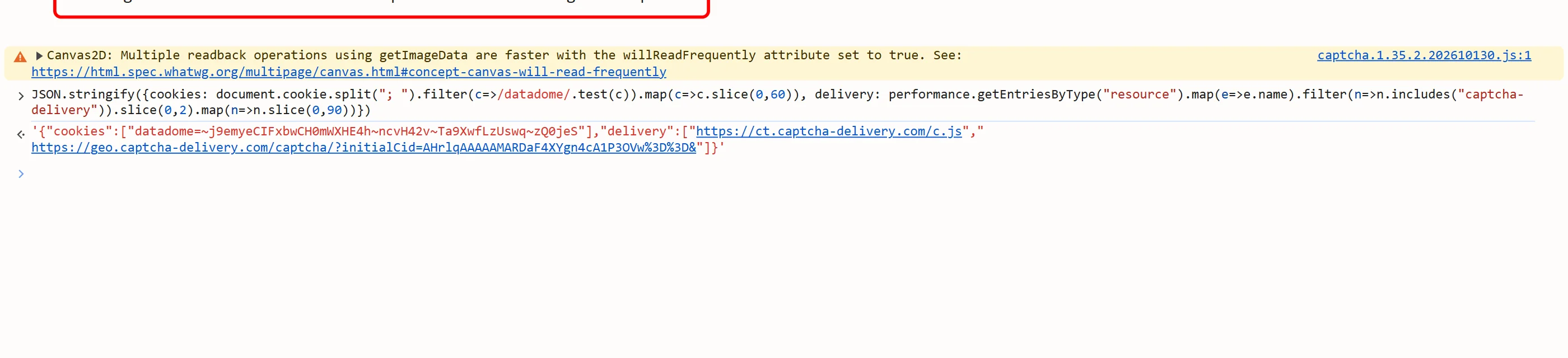
You recognise a block by its shape. On a page it arrives as an HTTP 403 with a small HTML body that contains a var dd object; on API and XHR endpoints it arrives as inline JSON with a url field that points at the captcha-delivery.com host. A datadome cookie is set on the response, and a challenge URL under /captcha/ is the slider, while /interstitial/ is the device check.

This product is solved with cookies: the aim is a validated datadome cookie to replay on the blocked session. The result also lists a token field and the user agent; the public catalog (GET /v1/task-types) lists each key.
Extension, API or automation?
SurSolver is an HTTP API: you call it from your own code, and there is no browser extension. You trigger the block yourself, send the page URL, the challenge URL and your proxy details, and get the cookie back. Your own client then replays it.
That works with any HTTP client, or with Playwright, Puppeteer and Selenium when a browser carries the session. The important part is that the block, the solve and the replay all use the same proxy.
How to find the parameters
First trigger the block: load the protected page through the proxy you will solve and replay with. You should get a 403 page, or a JSON response with a url on API calls.
Next, check the variant. In the page source, var dd with rt:'c' and the c.js script is the slider; rt:'i' with i.js is the interstitial. Then look at the t value in the challenge URL, before you spend anything: t=fe is solvable, and t=bv means the IP is banned at network level, so change the proxy and trigger the block again.
The challenge URL is the value to send. Prefer the url from the JSON block or the src of the challenge iframe, copied verbatim. Otherwise build it from the var dd fields, with the page URL percent-encoded as the referer. The blocked datadome cookie can be read from the Application panel, from the Set-Cookie response header, or from the challenge HTML, and can be sent as well. Extract everything right before you create the task, because the values are dynamic per render. Also send the page URL of the blocked page.
Where the cookies go
Set the returned datadome value as a cookie on the protected domain, or send it in a Cookie header, then retry the blocked request from the same proxy IP. If the solution includes a user agent, use exactly that value; otherwise reuse the one you triggered the block with. The headers and TLS fingerprint should look like a real browser for that user agent.
In browser automation, add the cookie through the cookie API before you navigate. Keep it and reuse it while the site accepts it, rather than solving on every request, and solve again when you are challenged.
Common mistakes
Changing the proxy or the user agent anywhere in the chain is the classic failure. The cookie is bound to the exit IP and the fingerprint, so the same sticky proxy and the same user agent must be used to trigger the block, fetch the challenge, solve and replay. A rotating proxy breaks all of that.
Sending a challenge URL with t=bv is the second: that IP is banned, and solving cannot clear it. Rotate the IP and trigger the block again. Datacenter addresses are frequently blocked as well, so residential or mobile sticky proxies work best.
If you get a cookie back and still see a 403, suspect the client, not the cookie. The TLS fingerprint, the header order and sometimes the Accept-Language value must match a real browser for the claimed user agent. And an interstitial can escalate to the slider: if the next challenge URL has a /captcha/ path, solve it as a slider.
Solve it with SurSolver
Send the page URL, the challenge URL and your proxy details to createTask with the task type DatadomeSliderTask, then poll getTaskResult until the status is ready. The solution carries the datadome cookie and, when the solver reports one, the user agent to replay it with. The accepted names and parameters are listed by the public catalog (GET /v1/task-types).