
What is GeeTest and how to recognise it
GeeTest is a behavioural captcha that exists in two incompatible generations, v3 and v4, and they must be treated as separate integrations. In v3 the page calls initGeetest, loads gt.js, holds a static public key called gt and fetches a fresh challenge from the site's own endpoint on every load. A solved session yields a challenge, validate and seccode triple.
In v4 the page calls initGeetest4, loads gt4.js or a script from gcaptcha4.geetest.com/load?captcha_id=..., and is configured with a static UUID-style captchaId. Risk analysis picks the challenge per visitor: slide, icon click, match-three, gobang, nine-grid or a silent pass. A solved session yields five fields.

Version detection is mechanical: initGeetest and gt.js are v3, initGeetest4 and gt4.js are v4. Mixing the parameters of one version into a task for the other fails.
Extension, API or automation?
SurSolver is called over plain HTTP, and there is no browser extension to install. GeeTest sits comfortably in a server-side job: the task needs values your code reads from the page or from the site's register request, and the result is a handful of fields your code posts back. A Playwright, Puppeteer or Selenium script works the same way if the form lives in a browser session.
GeeTest fits a scripted flow well because the parameters change per load. For v3 your code has to call the site's register endpoint, take the fresh challenge, create the task, wait for the result and submit all in one pass. For v4 the captchaId is static, so it can be configured once. The API never visits the target site; your code collects the parameters and submits the result.
How to find the parameters
First confirm the version, then collect what that version needs. Both need the page URL as websiteURL; send the exact page that shows the widget.
For v3 you need gt and challenge. Open DevTools, go to Network, reload, and find the site's own register or init request (names such as /register, /captcha/init or gettype.php are common). Its response holds the static gt, a 32-character public key that stays the same across loads, and a fresh challenge.
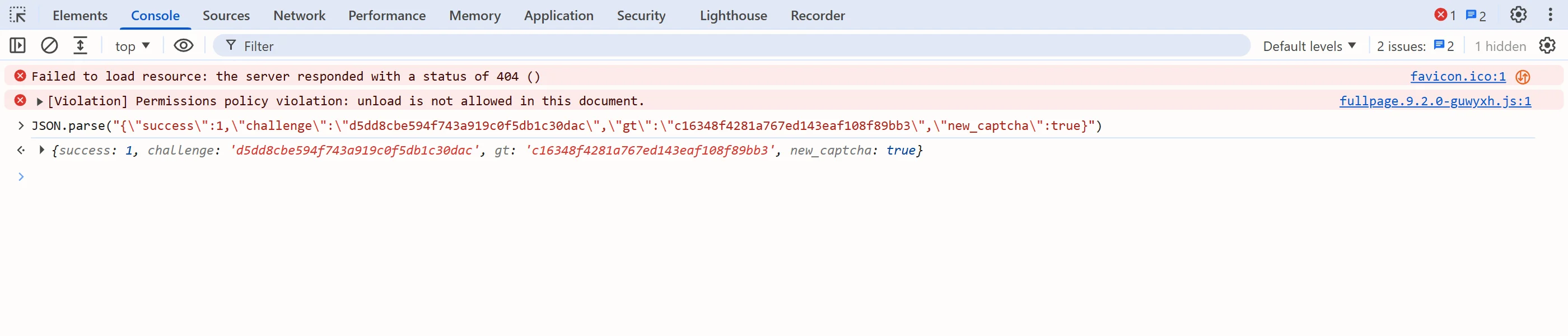
Repeat that request yourself to mint a new challenge right before every task. Also check which host serves gt.js and the API calls: the default is api.geetest.com, and a different one, such as api-na.geetest.com, goes in as geetestApiServerSubdomain.
For v4 you need only captchaId. Take it from the initGeetest4({ captchaId }) call in the page JavaScript, or from the captcha_id query parameter of the gcaptcha4.geetest.com/load script URL. It is static per site. riskType is optional; it is dynamic, single-use and expires fast, so capture and use it immediately or leave it out.
Where the token goes
For v3 the result is the triple challenge, validate and seccode. Place them in the form fields geetest_challenge, geetest_validate and geetest_seccode and submit; the site verifies them with GeeTest. Send all three: seccode is conventionally validate followed by |jordan, and sending only validate is not enough.
For v4 the result is five fields: captcha_id, lot_number, pass_token, gen_time and captcha_output. Solve the widget by hand once, intercept the site's own verify request in DevTools, and replay it with the same field names and the values from the solution. In a browser-automation script, do that with page.evaluate() and a fetch to the site's verify endpoint. Submit promptly after the task is ready.
Common mistakes
The most expensive mistake is a stale v3 challenge. It is single-use and short-lived; reusing one from an earlier page load returns an expired-token error and still costs a task. Mint a fresh one before every createTask and do not cache it.
Second, a wrong or non-default API host. If the page loads GeeTest from anything other than api.geetest.com, pass it as geetestApiServerSubdomain (a v3 field).
Third, sending riskType for v4 when you are not sure of it. It is optional and expires quickly, so when in doubt send only captchaId.
Fourth, mixing versions: a v3 gt and challenge sent to a v4 widget, or a v4 captchaId sent to a v3 one, looks like an invalid key.
Fifth, submitting only part of the result. v3 needs all three fields, v4 all five. Submit promptly after the task is ready, and re-solve rather than retry with an old payload.
Solve it with SurSolver
Send the page URL and the version's parameters to createTask with the task type GeeTestTaskProxyLess (or GeeTestTask when you want to solve through your own proxy), then poll getTaskResult until the status is ready. The solution carries the v3 triple or the v4 five-field payload, depending on what you sent. A task is charged when it is accepted, and failed tasks automatically return their original charge once; the accepted names and parameters are listed by the public catalog (GET /v1/task-types).