
Text captchas did not go anywhere. While the big providers moved to interactive widgets, thousands of sites still guard their login and registration forms with the classic four-to-six distorted characters, generated by a server-side library. There is no widget API to integrate with — just an <img> tag, a text input, and a server that compares what you typed with what it generated.
That shape is exactly what an automation needs, because the challenge is a plain image. This guide builds the whole loop with Playwright and Node: capture the captcha image from the page, send it to the SurSolver Image to Text solver as base64, receive the characters as a plain string, fill the form and submit.
Module 36 examples
Choose module: "36" and send the complete original image. The answer combines the requested answer and the five-digit code, separated by a space, for example 14 59695.
| Module | Example images |
|---|---|
36 |
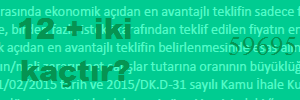 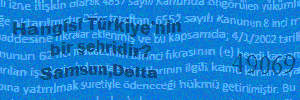 |
How the solve works
The Image to Text solver is module-based. Every generator distorts text in its own way, so each one has its own model, and you tell the API which one your target uses with the module parameter — the module table lists every id next to a real sample image, including the MTCaptcha text challenge.
The flow is three calls, one of them a poll:
POST /createTaskwith the task typeImageToTextTask, themoduleid and the captcha image as base64 (body). The task is charged on acceptance.POST /getTaskResultevery few seconds untilstatusisready.- The solution is a plain string:
solution.answer. Fill the form's captcha input with it and submit.
There is no proxy input, no userAgent, no token binding and no expiry race — the answer is only as valid as the form session behind it, so capture, solve and submit without re-requesting the image in between.
The Playwright script
The script below is the whole flow for a classic text-captcha form. It opens the page, locates the captcha <img>, extracts the image the browser actually received, solves it, fills the input and waits for the success marker. Point the five constants at your target and run it — Node 18 or newer, no packages beyond Playwright itself.
// npm i playwright && npx playwright install chromium
const { chromium } = require('playwright');

const API_KEY = 'sur_xxxxxxxxxxxxxxxxxxxxxxxxxxxxxxxx';
const TARGET_URL = 'https://example.com/login';
const CAPTCHA_IMG = 'img[src*="captcha"]';   // the <img> that shows the challenge
const CAPTCHA_INPUT = 'input[name="captcha"]';
const SUBMIT_SELECTOR = 'button[type="submit"]';
const SUCCESS_TEXT = 'Welcome';              // a string only the accepted page contains
const MODULE = '7';                          // pick yours from the module table

async function solveImage(base64) {
  const created = await fetch('https://api.sursolver.com/createTask', {
    method: 'POST',
    headers: { 'content-type': 'application/json' },
    body: JSON.stringify({
      clientKey: API_KEY,
      task: { type: 'ImageToTextTask', module: MODULE, body: base64 },
    }),
  }).then((r) => r.json());
  if (created.errorId !== 0) throw new Error(`createTask failed: ${created.errorCode}`);
  for (;;) {
    await new Promise((resolve) => setTimeout(resolve, 2000));
    const poll = await fetch('https://api.sursolver.com/getTaskResult', {
      method: 'POST',
      headers: { 'content-type': 'application/json' },
      body: JSON.stringify({ clientKey: API_KEY, taskId: created.taskId }),
    }).then((r) => r.json());
    if (poll.errorId !== 0) throw new Error(`getTaskResult failed: ${poll.errorCode}`);
    if (poll.status === 'ready') return poll.solution.answer;
  }
}

(async () => {
  const browser = await chromium.launch();
  const page = await browser.newPage();
  await page.goto(TARGET_URL);

  // The image the browser received, not a screenshot: read it from the cache.
  const base64 = await page.evaluate(async (selector) => {
    const element = document.querySelector(selector);
    const response = await fetch(element.src);
    const buffer = await response.arrayBuffer();
    let binary = '';
    const bytes = new Uint8Array(buffer);
    for (let i = 0; i < bytes.length; i++) binary += String.fromCharCode(bytes[i]);
    return btoa(binary);
  }, CAPTCHA_IMG);

  const answer = await solveImage(base64);

  await page.fill(CAPTCHA_INPUT, answer);
  await page.click(SUBMIT_SELECTOR);
  await page.waitForSelector(`text=${SUCCESS_TEXT}`, { timeout: 15000 });

  console.log('Solved and submitted. Answer was:', answer);
  await browser.close();
})();Two details worth calling out. The image is fetched from the element's src inside the page, so the bytes are exactly what the captcha endpoint served — a screenshot of the element would apply the device pixel ratio and the page zoom, and both hurt the answer rate. And the solver is called before any interaction with the form, because many of these libraries serve a fresh image on every request and accept only the latest one.
Reading the result
The solution carries one key:
{
  "errorId": 0,
  "status": "ready",
  "solution": { "answer": "fp4nnd" }
}The answer arrives in the case the model reads. Most of these libraries compare case-insensitively; the rare case-sensitive one is your cue to convert before submitting. A task that cannot be read comes back as a normal failed task with its charge refunded, and action-style soft answers do not exist here — you either get text or a refund.
Common mistakes
- The wrong module id. The models are per-library. Check the fonts and the noise pattern of your target against the module table; when in doubt, send support a sample image. A model trained on a different generator reads the right characters with the wrong shapes.
- Solving a stale image. If the page refreshed the captcha after you captured it, the form expects the new image and the answer fails. Capture, solve, submit — one pass, no re-request in between.
- A
data:prefix or a data URI inbody. The API takes raw base64 only. - Fighting the input rules. Some forms reject overlong input or strip characters; submit what the answer says before re-formatting it, then adjust if the site genuinely normalises case.
Where to go from here
The Image to Text solver page carries the module table and the task contract in one screen, and the public catalog (GET /v1/task-types) lists the accepted names and fields. If your target turns out to run an MTCaptcha widget with a sitekey and a token flow, that is not an image task — the MTCaptcha solver covers it end to end. For the slide and grid challenges, the DataDome, GeeTest and AWS WAF pages carry their own flows.