
Some captcha results only work from the IP address that earned them. This post shows which SurSolver task types take your proxy, how to choose and pin one, how to send it to createTask, and how to find out why a proxy fails before it costs you tasks.
When a task needs your proxy
The proxies guide sorts every type into one of three modes:
- Required. Cloudflare Challenge, Vercel, CaptchaFox, Akamai, DataDome and PerimeterX have no proxyless name. A proxyless name for any of them answers
ERROR_TYPE_NOT_SUPPORTED. - Optional. reCAPTCHA v2 and v3, Turnstile, FriendlyCaptcha, Prosopo, GeeTest and MTCaptcha. The
…TaskProxyLessname never needs a proxy. The proxy-capable…Taskname does: sending it without proxy details is rejected withERROR_INVALID_REQUEST. - None. Altcha is proxyless only.
If a type offers a proxyless name, start there. The research behind the Turnstile guide says a proxy helps only when the receiving site ties the token to an IP, and the symptom is specific: a valid-looking token is refused, while the same flow in your own browser works. If the solve itself fails, a proxy is not the fix.
One exit IP for the whole flow
For the cookie types the flow has four steps: load the page and trigger the block, create the task, receive the solution, replay it. The proxy in the task is the IP the solve runs from, so every request you make yourself must leave from the same address. The Cloudflare challenge guide puts it plainly: cf_clearance is bound to the exit IP and the user agent, and a rotating proxy makes Cloudflare treat you as cookieless again.
Token types behave the same when a site checks the IP. The CaptchaFox research note records the failure as invalid-ip-match on the site's server-side verification: the token was earned from one address and submitted from another.
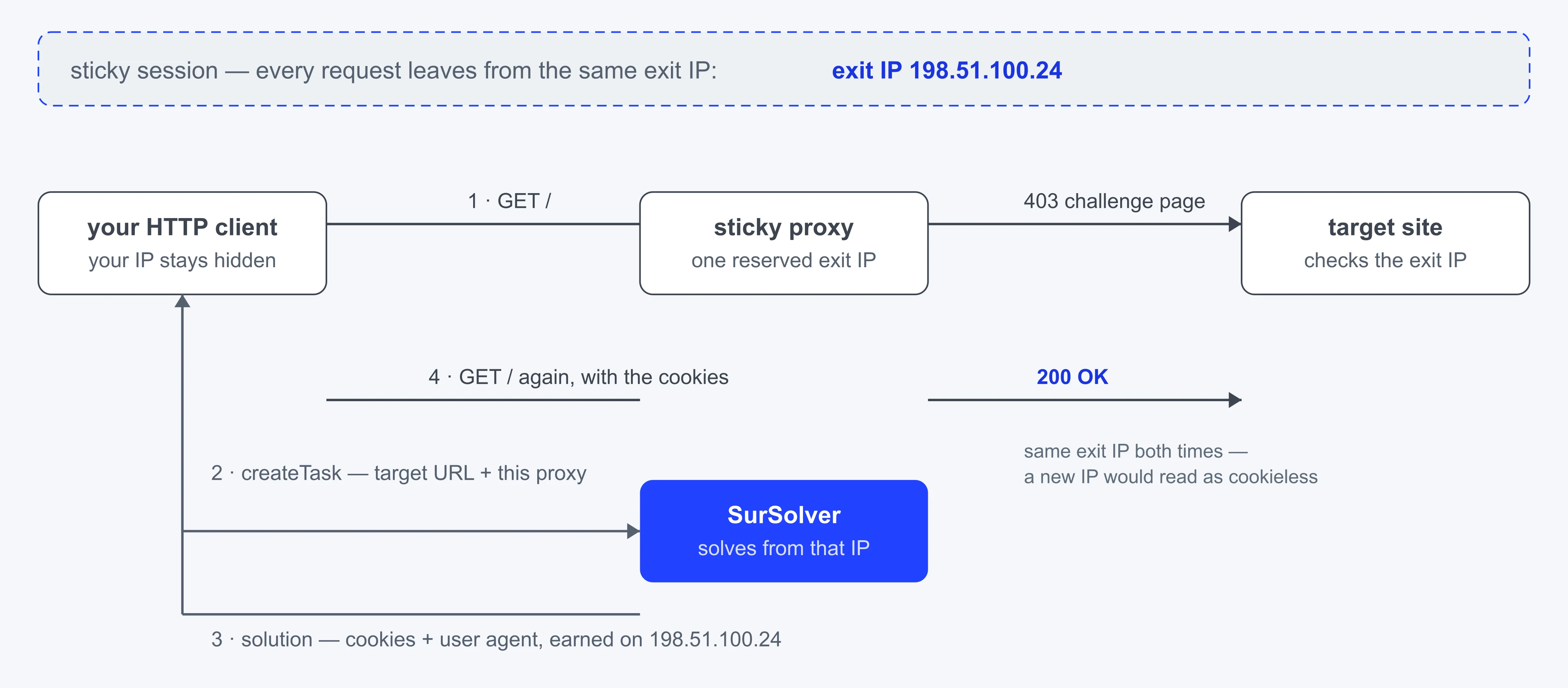
Sticky or rotating
A rotating gateway hands out a different exit IP per request or per interval. A sticky session keeps one IP for a period. For anything that must match, rotating turns "same IP" into a coin flip, so use a sticky session or a static address.
How you pin a session is specific to your proxy provider; look for "sticky session" in its documentation. SurSolver's docs do not state a minimum session length. Other solvers' documents in our research ask for sessions of roughly three to ten minutes, so treat five minutes as a starting point and size it to cover the block, the solve and every replayed request. Interactive challenges take longer than managed ones.
Keep one session per flow: its own IP, its own user agent, its own cookies. Do not share a pinned IP between unrelated flows on the same site, and do not change anything mid-flow.
Choose the proxy class
The sources do not rank proxy vendors and neither does this post. They do agree on classes:
- Datacenter. The proxies guide says anti-bot vendors commonly refuse datacenter ranges. The Akamai, DataDome and PerimeterX notes say the same, and the reCAPTCHA v3 note reports lower scores for datacenter and VPN addresses. One solver's guidance reserves datacenter proxies for low-protection targets and smoke tests.
- Residential. The research for DataDome, Akamai and PerimeterX converges on residential, mobile or static ISP addresses held in a sticky session.
- Static ISP. A static ISP proxy keeps one address, so there is no session to pin.
- Mobile. One solver's guidance reaches for mobile only when residential addresses are being flagged.
Match the country to the site's audience and to the Accept-Language you send. The Akamai note advises aligning the language with the proxy region, and the reCAPTCHA v3 note reports better scores from same-country addresses. Both are hedged in the sources, so test against your target.
Send the proxy to createTask
task.proxy takes a string. The scheme is http, https, socks4 or socks5, and http is assumed without one:
http://user:password@203.0.113.10:8000
socks5://user:password@203.0.113.10:1080
user:password@203.0.113.10:8000
203.0.113.10:8000A string with exactly four colon-separated parts is always read as user:password:host:port. Many providers hand out host:port:user:password instead, and that string is not rejected when it happens to parse the other way. 203.0.113.10:8000:user:12345 becomes user 203.0.113.10, password 8000, host user, port 12345. The task is accepted, charged, and run through the wrong proxy.
The split fields avoid the problem because nothing depends on order. They are read only when task.proxy is absent or empty:
{
  "clientKey": "YOUR_API_KEY",
  "task": {
    "type": "ReCaptchaV2Task",
    "websiteURL": "https://example.com/login",
    "websiteKey": "6Le...",
    "proxyType": "http",
    "proxyAddress": "203.0.113.10",
    "proxyPort": 8000,
    "proxyLogin": "user",
    "proxyPassword": "password"
  }
}proxyAddress and proxyPort go together, proxyType is one of the four schemes, and proxyLogin and proxyPassword are optional. The proxy belongs to the task, not to the account: every createTask that needs one carries its own details.
This helper converts a host:port:user:password string into split fields, creates the task and polls every 3 seconds. The 180-second deadline is yours to choose; the docs state no maximum solve time.
import os
import time

import requests

API = 'https://api.sursolver.com'
POLL_SECONDS = 3
DEADLINE_SECONDS = 180
REQUEST_TIMEOUT_SECONDS = 30


def call(path: str, body: dict) -> dict:
    response = requests.post(f'{API}{path}', json=body, timeout=REQUEST_TIMEOUT_SECONDS)
    response.raise_for_status()  # HTTP 500 carries no errorId: a transport failure
    data = response.json()
    if data.get('errorId'):
        raise RuntimeError(f"{data['errorCode']}: {data['errorDescription']}")
    return data


def split_fields(raw: str) -> dict:
    """Turn host:port:user:password into the split proxy fields."""
    host, port, login, password = raw.split(':', 3)
    return {
        'proxyType': 'http',
        'proxyAddress': host,
        'proxyPort': int(port),
        'proxyLogin': login,
        'proxyPassword': password,
    }


def solve(raw_proxy: str) -> dict:
    key = os.environ['SURSOLVER_API_KEY']
    task = {
        'type': 'ReCaptchaV2Task',
        'websiteURL': 'https://example.com/login',
        'websiteKey': '6Le...',
        **split_fields(raw_proxy),
    }
    task_id = call('/createTask', {'clientKey': key, 'task': task})['taskId']
    deadline = time.monotonic() + DEADLINE_SECONDS
    while time.monotonic() < deadline:
        time.sleep(POLL_SECONDS)
        result = call('/getTaskResult', {'clientKey': key, 'taskId': task_id})
        if result['status'] == 'ready':
            return result['solution']
raise TimeoutError(f'task {task_id} still processing after {DEADLINE_SECONDS}s')IP-authenticated proxies
A bare host:port is how IP-allowlisted proxies are used: the proxy trusts a list of source addresses instead of a login. The SurSolver docs do not publish the addresses that solves run from, so you have no list to give your proxy provider. Use a proxy with username and password credentials, and ask support before you depend on an allowlist.
Test the proxy before you submit
A task is charged when it is accepted, and a task that finishes as failed automatically returns its original charge once. A dead proxy prevents a useful result. Check it from your own machine first. https://ip-echo.example/ip stands for any service that returns the caller's IP address; use one you trust:
PROXY='http://user:password@203.0.113.10:8000'
curl -sS -x "$PROXY" https://ip-echo.example/ip
sleep 30
curl -sS -x "$PROXY" https://ip-echo.example/ipBoth answers should show the proxy's address, not yours, and they should match. If the second differs, the session is not sticky.
When a proxy fails
| What you see | Likely cause | What to do |
|---|---|---|
ERROR_INVALID_REQUEST from createTask |
Unparseable string, unknown scheme, missing or non-numeric port, or a proxy-capable name without a proxy | Fix the named field. Nothing was created or charged. |
Accepted, then ERROR_FAILED |
The solve failed; errorDescription carries the reason. The target may have blocked the proxy IP |
Submit a new task through a different proxy. It is a new charge. |
ready, but the target refuses the result |
A different IP or user agent on replay, a rotating gateway, or a client whose TLS differs from a browser | Replay from the same exit with solution.userAgent. See headers and user agents. |
DataDome challenge URL has t=bv |
The IP is banned at network level and solving cannot clear it | Rotate the IP and trigger the block again. |
| Task ran through the wrong proxy | A four-part string in the other order | Use the split fields. |
When blocks are frequent rather than occasional, the cause is usually your request pattern, not one proxy. Stop getting blocked while scraping covers that.
Next steps
Pick the type you need on its solver page and check its proxy mode in the proxies guide. Then send a createTask with split fields, and read Errors for what each failure means.