
This post shows the same Selenium flow in Python, JavaScript and C#: open the page, read the captcha's parameters, get a token from the SurSolver API, put it where the page expects it and submit. The examples use reCAPTCHA v2 on a plain form because it is the most common case; the last sections cover what changes for other types and for cookie results.
How the pieces fit
Selenium drives the browser; it does not solve anything. The solve happens through two HTTP calls that your script makes outside the browser:
- Read the page URL and the site key from the page.
POST /createTaskwith those values, thenPOST /getTaskResultevery 3 seconds until the status isready.- Write the token into the page and submit the form.
API errors come back as HTTP 200 with errorId: 1, so every example checks errorId; an unexpected server fault is an HTTP 500 without errorId, which the HTTP client turns into an exception. The polling limit of 60 attempts matches the API examples.
The order matters. A reCAPTCHA v2 token is single-use and lasts about two minutes, so read the widget first, fill the rest of the form, solve, and submit straight after the token arrives.
Selenium-specific details
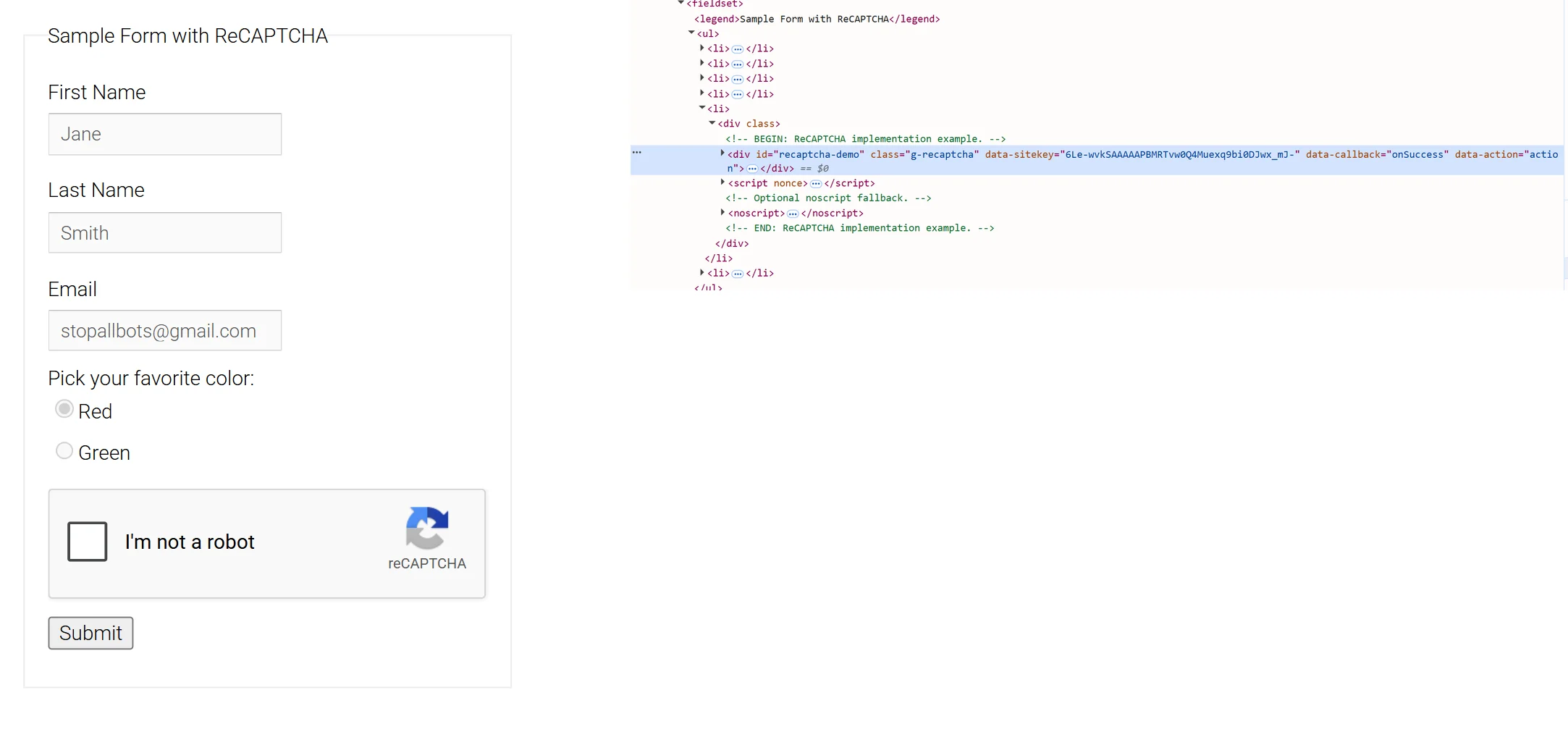
- Read values from the DOM. WebDriver gives you elements and lets you run JavaScript in the page. The site key is usually the
data-sitekeyattribute of the.g-recaptchaelement. When the page builds the widget from JavaScript, read it with a script instead; how to identify any captcha lists where each type keeps its parameters. - The token field is hidden.
g-recaptcha-responseis a hidden textarea, and WebDriver does not type into hidden elements. Set its value withexecuteScript. - Callbacks. When the widget has a
data-callbackattribute, call that function with the token as well; the page may wait for it rather than for the field. How to submit a captcha token covers named and anonymous callbacks.
Python
Requires selenium and requests.
import os
import time

import requests
from selenium import webdriver
from selenium.webdriver.common.by import By
from selenium.webdriver.support import expected_conditions as EC
from selenium.webdriver.support.ui import WebDriverWait

API = 'https://api.sursolver.com'
CLIENT_KEY = os.environ['SURSOLVER_API_KEY']
POLL_SECONDS = 3
POLL_ATTEMPTS = 60
PAGE_URL = 'https://example.com/login'
SET_TOKEN = "document.getElementById('g-recaptcha-response').value = arguments[0];"


def call(path, body):
    response = requests.post(f'{API}{path}', json=body, timeout=30)
    response.raise_for_status()  # an unexpected fault is HTTP 500 without errorId
    data = response.json()
    if data.get('errorId'):
        raise RuntimeError(f"{data['errorCode']}: {data.get('errorDescription')}")
    return data


def solve(task):
    created = call('/createTask', {'clientKey': CLIENT_KEY, 'task': task})
    for _ in range(POLL_ATTEMPTS):
        result = call('/getTaskResult', {'clientKey': CLIENT_KEY, 'taskId': created['taskId']})
        if result['status'] == 'ready':
            return result['solution']
        time.sleep(POLL_SECONDS)
    raise TimeoutError(f"task {created['taskId']} was not ready in {POLL_ATTEMPTS} polls")


driver = webdriver.Chrome()
try:
    driver.get(PAGE_URL)
    widget = WebDriverWait(driver, 15).until(
        EC.presence_of_element_located((By.CSS_SELECTOR, '.g-recaptcha[data-sitekey]'))
    )
    site_key = widget.get_attribute('data-sitekey')
    driver.find_element(By.NAME, 'email').send_keys('user@example.com')

    solution = solve({
        'type': 'ReCaptchaV2TaskProxyLess',
        'websiteURL': PAGE_URL,
        'websiteKey': site_key,
    })
    driver.execute_script(SET_TOKEN, solution['gRecaptchaResponse'])
    driver.find_element(By.CSS_SELECTOR, 'form button[type="submit"]').click()
finally:
driver.quit()JavaScript
Requires selenium-webdriver and Node.js 18 or later for the built-in fetch.
const { Builder, By, until } = require('selenium-webdriver');
const { setTimeout: sleep } = require('node:timers/promises');

const API = 'https://api.sursolver.com';
const CLIENT_KEY = process.env.SURSOLVER_API_KEY;
const POLL_ATTEMPTS = 60;
const POLL_INTERVAL_MS = 3000;
const PAGE_URL = 'https://example.com/login';
const SET_TOKEN = "document.getElementById('g-recaptcha-response').value = arguments[0];";

async function call(path, body) {
  const res = await fetch(`${API}${path}`, {
    method: 'POST',
    headers: { 'Content-Type': 'application/json' },
    body: JSON.stringify(body),
  });
  if (!res.ok) throw new Error(`HTTP ${res.status}`); // a fault is HTTP 500 without errorId
  const data = await res.json();
  if (data.errorId !== 0) throw new Error(`${data.errorCode}: ${data.errorDescription}`);
  return data;
}

async function solve(task) {
  const created = await call('/createTask', { clientKey: CLIENT_KEY, task });
  for (let attempt = 0; attempt < POLL_ATTEMPTS; attempt += 1) {
    const result = await call('/getTaskResult', { clientKey: CLIENT_KEY, taskId: created.taskId });
    if (result.status === 'ready') return result.solution;
    await sleep(POLL_INTERVAL_MS);
  }
  throw new Error(`task ${created.taskId} was not ready in ${POLL_ATTEMPTS} polls`);
}

(async () => {
  const driver = await new Builder().forBrowser('chrome').build();
  try {
    await driver.get(PAGE_URL);
    const widget = await driver.wait(
      until.elementLocated(By.css('.g-recaptcha[data-sitekey]')),
      15000,
    );
    const siteKey = await widget.getAttribute('data-sitekey');
    await driver.findElement(By.name('email')).sendKeys('user@example.com');

    const solution = await solve({
      type: 'ReCaptchaV2TaskProxyLess',
      websiteURL: PAGE_URL,
      websiteKey: siteKey,
    });
    await driver.executeScript(SET_TOKEN, solution.gRecaptchaResponse);
    await driver.findElement(By.css('form button[type="submit"]')).click();
  } finally {
    await driver.quit();
  }
})();C#
A .NET 8 or later console app with the Selenium.WebDriver and Selenium.Support packages; the API calls use HttpClient and System.Text.Json.
using System.Net.Http.Json;
using System.Text.Json;
using OpenQA.Selenium;
using OpenQA.Selenium.Chrome;
using OpenQA.Selenium.Support.UI;

const string Api = "https://api.sursolver.com";
const string PageUrl = "https://example.com/login";
const int PollAttempts = 60;
const string SetToken = "document.getElementById('g-recaptcha-response').value = arguments[0];";
var pollInterval = TimeSpan.FromSeconds(3);
var clientKey = Environment.GetEnvironmentVariable("SURSOLVER_API_KEY")
    ?? throw new InvalidOperationException("SURSOLVER_API_KEY is not set");
using var http = new HttpClient { Timeout = TimeSpan.FromSeconds(30) };

async Task<JsonElement> Call(string path, object body)
{
    using var response = await http.PostAsJsonAsync($"{Api}{path}", body);
    response.EnsureSuccessStatusCode(); // an unexpected fault is HTTP 500 without errorId
    var data = await response.Content.ReadFromJsonAsync<JsonElement>();
    if (data.GetProperty("errorId").GetInt32() != 0)
    {
        var code = data.GetProperty("errorCode").GetString();
        var description = data.GetProperty("errorDescription").GetString();
        throw new InvalidOperationException($"{code}: {description}");
    }
    return data;
}

async Task<JsonElement> Solve(object task)
{
    var created = await Call("/createTask", new { clientKey, task });
    var taskId = created.GetProperty("taskId").GetString();
    for (var attempt = 0; attempt < PollAttempts; attempt++)
    {
        var result = await Call("/getTaskResult", new { clientKey, taskId });
        if (result.GetProperty("status").GetString() == "ready")
        {
            return result.GetProperty("solution");
        }
        await Task.Delay(pollInterval);
    }
    throw new TimeoutException($"task {taskId} was not ready in {PollAttempts} polls");
}

using var driver = new ChromeDriver();
driver.Navigate().GoToUrl(PageUrl);
var wait = new WebDriverWait(driver, TimeSpan.FromSeconds(15));
var widget = wait.Until(d => d.FindElement(By.CssSelector(".g-recaptcha[data-sitekey]")));
var siteKey = widget.GetDomAttribute("data-sitekey");
driver.FindElement(By.Name("email")).SendKeys("user@example.com");

var solution = await Solve(new
{
    type = "ReCaptchaV2TaskProxyLess",
    websiteURL = PageUrl,
    websiteKey = siteKey,
});
var token = solution.GetProperty("gRecaptchaResponse").GetString();
((IJavaScriptExecutor)driver).ExecuteScript(SetToken, token);
driver.FindElement(By.CssSelector("form button[type=\"submit\"]")).Click();PostAsJsonAsync serialises the anonymous objects with camel-case names, which leaves clientKey, taskId, websiteURL and websiteKey exactly as the API expects them.
Other captcha types
Only three things change per type: the type name, the parameters you read from the page, and the field or callback the token goes to. For Cloudflare Turnstile, for example, send TurnstileTokenProxyLess with websiteURL and websiteKey, read solution.token and write it to cf-turnstile-response. Each type's accepted names, parameters and result keys are in the public catalog (GET /v1/task-types); the reCAPTCHA v2 guide and the Turnstile guide cover recognising those two widgets and reading their parameters.
A solution carries userAgent only when the solver reports one. When it does and the target checks it, start the browser that submits with that user agent, for example with Chrome's --user-agent= argument, which means solving before you open the browser that submits the token.
Cookie results
Cloudflare's challenge page, DataDome, Akamai and PerimeterX return cookies instead of a token. The solution's cookies key is a list of objects with name and value, plus domain and path when the solver reports them. WebDriver only sets a cookie for the domain of the page that is currently open, so load a page on that domain first:
driver.get('https://www.example.com/robots.txt')  # any page on the cookie's domain
for cookie in solution['cookies']:
    driver.add_cookie({
        'name': cookie['name'],
        'value': cookie['value'],
        'path': cookie.get('path', '/'),
    })
driver.get('https://www.example.com/protected')These cookies are bound to the exit IP and the browser that earned them. The browser has to use the same proxy as the task, and the same user agent; proxies for captcha solving and browser headers and user agents cover both.
Common failures
ElementNotInteractableExceptionon the token field. The field is hidden; useexecuteScriptinstead ofsendKeys.- The form submits but the site says the captcha is missing. The page waits for its callback, or the field name differs from
g-recaptcha-response. timeout-or-duplicatefrom the site. The token was used twice or arrived too late. Solve right before the submit.invalid cookie domainfrom WebDriver. The browser was not on the cookie's domain whenadd_cookieran.- Retrying in a loop. A task is charged when
createTaskaccepts it, and a task that finishes as failed automatically returns its original charge once. Fix the cause before you resubmit.
Next steps
Get an API key, set SURSOLVER_API_KEY and run the example for your language against your own page. The quickstart explains createTask, getTaskResult and getBalance, and the reCAPTCHA v2 guide covers the widget's variants. If you would rather drive the browser with Playwright, the Playwright recipe follows the same steps.