
GeeTest ships in two generations that look similar on screen and share nothing on the wire. After reading this you will be able to tell which one a page uses, collect the right inputs, send a correct createTask body, mint a fresh v3 challenge before every solve and put the result where the site expects it.
What changed from v3 to v4
Treat v3 and v4 as two separate integrations. They have different page markers, different input parameters and different results.
| v3 | v4 | |
|---|---|---|
| Page marker | initGeetest( and gt.js |
initGeetest4(, gt4.js, or a script from gcaptcha4.geetest.com/load?captcha_id=... |
| Static key | gt (32-character public key) |
captchaId (UUID-style identifier) |
| Per-load value | challenge, minted by the site on every load |
none; riskType is optional and short-lived |
| Result | challenge, validate, seccode |
captcha_id, lot_number, pass_token, gen_time, captcha_output |
v4 also picks the puzzle per visitor (slide, icon click, match-three, gobang, nine-grid) and can pass silently with no puzzle at all. That choice happens inside the widget; it does not change what you send to the API.
SurSolver serves both versions through one service. The task types are GeeTestTaskProxyLess and GeeTestTask (the second takes your own proxy). GeeTestV3Token and GeeTestV4Token are accepted as other names for the same service. The version is decided by the parameters you send, so a v3 body and a v4 body differ only in their fields.
Detect your version
Look for the markers in the page source. If the site loads the widget script at runtime, check the Network tab instead.
curl -sL https://example.com/login \
  | grep -oE 'initGeetest4|gt4\.js|gcaptcha4\.geetest\.com|initGeetest\(|/gt\.js' \
| sort -uinitGeetest( or /gt.js means v3. initGeetest4, gt4.js or gcaptcha4.geetest.com means v4. Sending v3 parameters to a v4 widget, or the reverse, fails and looks like an invalid key.

v3 parameters
A v3 task needs websiteURL, gt and challenge. Add geetestApiServerSubdomain only when the page does not use the default host.
{
  "clientKey": "YOUR_API_KEY",
  "task": {
    "type": "GeeTestTaskProxyLess",
    "websiteURL": "https://example.com/login",
    "gt": "022397c99c9f646f6477822485f30404",
    "challenge": "7f044f48bc951ecfbfc03842b5e1fe59",
    "geetestApiServerSubdomain": "api-na.geetest.com"
  }
}Find gt and challenge in the site's own register request, not in GeeTest's. Open DevTools, go to Network, reload, and look for a call such as /register, /captcha/init or gettype.php. Its response carries the static gt and a fresh challenge.
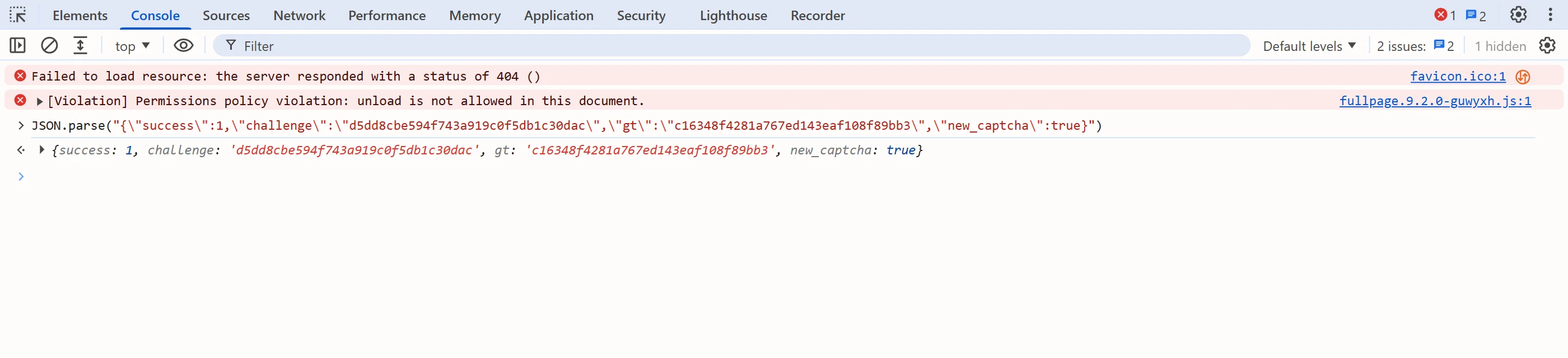
The default API host is api.geetest.com. If gt.js or the API calls come from something else, such as api-na.geetest.com, pass that host as geetestApiServerSubdomain. It is a v3-only field.
Mint a fresh challenge for every solve
The v3 challenge is single-use and short-lived. Reusing one from an earlier page load fails, and the failed task returns its original charge once: SurSolver initially charges a task when createTask accepts it, and failed tasks automatically return their original charge once (see Billing). So never cache a challenge. Call the register endpoint, then immediately create the task.
Start with a small client. It polls every 3 seconds, gives up after 60 polls and raises on errorId:
import time

import requests

API = 'https://api.sursolver.com'
CLIENT_KEY = 'YOUR_API_KEY'
POLL_SECONDS = 3
POLL_ATTEMPTS = 60


def call(path, body):
    response = requests.post(f'{API}{path}', json=body, timeout=30)
    response.raise_for_status()
    data = response.json()
    if data.get('errorId'):
        raise RuntimeError(f"{data['errorCode']}: {data['errorDescription']}")
    return data


def solve(task):
    created = call('/createTask', {'clientKey': CLIENT_KEY, 'task': task})
    for _ in range(POLL_ATTEMPTS):
        result = call(
            '/getTaskResult',
            {'clientKey': CLIENT_KEY, 'taskId': created['taskId']},
        )
        if result['status'] == 'ready':
            return result['solution']
        time.sleep(POLL_SECONDS)
raise TimeoutError(f"task {created['taskId']} was not ready in {POLL_ATTEMPTS} polls")Then wrap the register call and the task in one function:
PAGE_URL = 'https://example.com/login'
REGISTER_URL = 'https://example.com/api/geetest/register'  # the site's own endpoint


def solve_v3():
    registered = requests.get(REGISTER_URL, timeout=15).json()
    return solve({
        'type': 'GeeTestTaskProxyLess',
        'websiteURL': PAGE_URL,
        'gt': registered['gt'],
        'challenge': registered['challenge'],
})The field names in registered depend on the site; read them from the response you saw in DevTools. If a retry is needed, call solve_v3() again rather than resending the old task body.
v4 parameters
A v4 task needs websiteURL and captchaId:
{
  "clientKey": "YOUR_API_KEY",
  "task": {
    "type": "GeeTestTaskProxyLess",
    "websiteURL": "https://example.com/login",
    "captchaId": "54088bb07d2df3c46b79f80300b0abbe"
  }
}captchaId is static per site, so you can read it once. Take it from the initGeetest4({ captchaId: ... }) call in the page JavaScript, or from the captcha_id query parameter of the gcaptcha4.geetest.com/load script URL.
riskType is optional. It comes from the widget's load request, it is dynamic and single-use, and it expires quickly. Capture it and use it immediately, or leave it out. When in doubt, send only captchaId.
The catalog also lists initParameters as optional. This post sticks to the flat captchaId field; if you are porting a request from a solver API that nests the identifier, move it into captchaId.
def solve_v4(captcha_id):
    return solve({
        'type': 'GeeTestTaskProxyLess',
        'websiteURL': PAGE_URL,
        'captchaId': captcha_id,
})Proxy or no proxy
GeeTestTaskProxyLess solves without a proxy from you, and it is the right default. Use GeeTestTask only when the target is sensitive to the solving IP. That name requires proxy details, and a request without them is rejected with ERROR_INVALID_REQUEST. A four-part proxy string is always read as user:password:host:port; the proxies guide lists the other accepted formats.
Solution shapes compared
Both results arrive in solution once status is ready. The keys follow the version you sent.
{
  "errorId": 0,
  "status": "ready",
  "solution": {
    "challenge": "0f759dd1ea6c4wc76cedc2991039ca4f23",
    "validate": "6275e26419211d1f526e674d97110e15",
    "seccode": "6275e26419211d1f526e674d97110e15|jordan"
  }
}{
"errorId": 0,
"status": "ready",
"solution": {
"captcha_id": "54088bb07d2df3c46b79f80300b0abbe",
"lot_number": "bcb2c6ce2f8e4e9da74f2c1fa63bd713",
"pass_token": "edc7a17716535a5ae624ef4707cb6e7e478dc557608b068d202682c8297695cf",
"gen_time": "1683794919",
"captcha_output": "XwmTZEJCJEnRIJBlvtEAZ662T…"
}
}Submit every field. For v3, seccode is conventionally validate followed by |jordan, but do not rebuild it yourself; send the three values you received. For v4, the site's server verifies the payload against its private key (GeeTest's server documentation describes an HMAC-SHA256 over lot_number), so a partial or altered payload fails.
Submit the result
For v3, put the three values into the fields geetest_challenge, geetest_validate and geetest_seccode, then submit the form. Use the challenge from the solution, not the one you sent in the task.
solution = solve_v3()
page.evaluate(
    """(s) => {
      document.querySelector('input[name="geetest_challenge"]').value = s.challenge;
      document.querySelector('input[name="geetest_validate"]').value = s.validate;
      document.querySelector('input[name="geetest_seccode"]').value = s.seccode;
    }""",
    solution,
)
page.click('button[type="submit"]')For v4, solve the widget by hand once, find the site's own verify request in DevTools and replay it with the same field names and the values from the solution. The snippet below posts to a placeholder /api/verify; replace the URL and the body shape with what the site's request uses.
solution = solve_v4('54088bb07d2df3c46b79f80300b0abbe')
reply = page.evaluate(
    """async (s) => {
      const response = await fetch('/api/verify', {
        method: 'POST',
        headers: { 'Content-Type': 'application/json' },
        body: JSON.stringify({
          captcha_id: s.captcha_id,
          lot_number: s.lot_number,
          captcha_output: s.captcha_output,
          pass_token: s.pass_token,
          gen_time: s.gen_time,
        }),
      });
      return response.json();
    }""",
    solution,
)The replay approach is the practical route rather than a documented contract, so check it against your target. Submit right after the task is ready, and re-solve instead of retrying with an old payload. For general patterns on where tokens go, see how to submit a captcha token, and for locating parameters on any page, identify any captcha and extract its parameters.
Troubleshooting matrix
| Symptom | Likely cause | Fix |
|---|---|---|
| v3 solve fails, task still charged | Stale or reused challenge |
Call the register endpoint again before every createTask; never cache |
| Looks like an invalid key | v3 fields sent to a v4 widget, or the reverse | Re-check the markers; send gt and challenge, or captchaId, never a mix |
| v3 fails only on some sites | Non-default API host | Pass the host as geetestApiServerSubdomain |
v4 fails when riskType is set |
The value expired or was already used | Omit riskType and send only captchaId |
| Site rejects the v3 answer | Only validate submitted |
Send challenge, validate and seccode together |
| Site rejects a v4 payload that solved fine | Payload submitted late or reused | Submit right after ready; solve again |
ERROR_INVALID_REQUEST |
A required field is missing; errorDescription names it |
Add websiteURL, and gt plus challenge or captchaId |
SurSolver has no GeeTest-specific error code. A failed solve is ERROR_FAILED with the reason in errorDescription; see Errors for the full list.
Next steps
Create the task from your own code with the type GeeTestTaskProxyLess, using the v3 or v4 body above. The accepted parameters are listed by the public catalog (GET /v1/task-types), and the GeeTest solver guide covers recognising the widget. If your flow runs in a browser, the Playwright recipe shows the surrounding script.