
A solve request is only as good as the parameters in it. Send the wrong task type, a site key from another widget or a stale one-time value, and the token comes back unusable. This guide shows how to name the CAPTCHA on a page from its markers, read its parameters from the source, and capture the values that are generated on every load. You will end with a checklist of what each SurSolver task type needs.
Identify the type before anything else
Several CAPTCHAs look alike on screen and take different task types: standard and Enterprise reCAPTCHA, invisible v2 and v3, a Turnstile widget and a Cloudflare challenge page, GeeTest v3 and v4. A request for the wrong one is rejected or produces a token the site refuses. Spend the first minute on identification and the rest gets easier.
Open DevTools (F12), reload the page with the Network tab open, then search the Elements tab and the page source for the markers below. The overview of CAPTCHA types explains what each one does after it passes.
Markers by type
| You see or find | It is | Solver guide |
|---|---|---|
g-recaptcha element, api.js, requests to /recaptcha/api2/anchor |
reCAPTCHA v2 | reCAPTCHA v2 |
enterprise.js, requests to /recaptcha/enterprise/anchor |
reCAPTCHA Enterprise (v2 or v3) | reCAPTCHA v2, reCAPTCHA v3 |
api.js?render=KEY, grecaptcha.execute(KEY, {action: …}), no widget |
reCAPTCHA v3 | reCAPTCHA v3 |
cf-turnstile element, script from challenges.cloudflare.com/turnstile/v0/api.js, key starting 0x |
Cloudflare Turnstile | Turnstile |
First request returns 403 with a "Just a moment…" page, __cf_chl_f_tk= in the form action |
Cloudflare challenge page | Cloudflare Challenge |
initGeetest( or gt.js / initGeetest4(, gt4.js or gcaptcha4.geetest.com/load?captcha_id= |
GeeTest v3 / v4 | GeeTest |
widget.module.min.js or widget.min.js / site.min.js, a puzzle?sitekey= request |
FriendlyCaptcha v1 / v2 | FriendlyCaptcha |
<altcha-widget> with a challenge or challengeurl attribute |
Altcha | Altcha |
procaptcha element, js.prosopo.io/js/procaptcha.bundle.js |
Prosopo | Prosopo |
cdn.captchafox.com/api.js, key starting sk_ |
CaptchaFox | CaptchaFox |
service.mtcaptcha.com/mtcv1/client/mtcaptcha.min.js, mtcaptchaConfig with a MTPublic- key |
MTCaptcha | MTCaptcha |
_abck and bm_sz cookies, a POST of sensor_data, HTTP 428 |
Akamai Bot Manager | Akamai |
403 with a var dd object, geo.captcha-delivery.com, a datadome cookie |
DataDome | DataDome |
_px3 cookie, _pxAppId in the source, px-cdn.net requests, "Press & Hold" |
PerimeterX | PerimeterX |
Three of these need a second look:
- Standard or Enterprise. The script file decides it.
api.jsis standard,enterprise.jsis Enterprise, and each has its own task type. A token from the wrong one is rejected. - Invisible v2 or v3. Both show no widget. In the Network tab
api2/reload?k=appears in both, whileapi2/userverify?k=appears only for invisible v2. If the widget iframe URL containssize=invisible, setisInvisiblefor v2. - Widget or challenge page. A Turnstile widget sits in a page that loads normally. A challenge page replaces the page you asked for, and it needs a proxy and different inputs.
The research behind this table has no documented page markers for the Vercel Security Checkpoint, so identify that one by what it is: a full-page challenge shown before the site. See the Vercel guide.
Find the site key
Most widget types need websiteURL (the full URL of the page that shows the widget, including its path) and websiteKey.
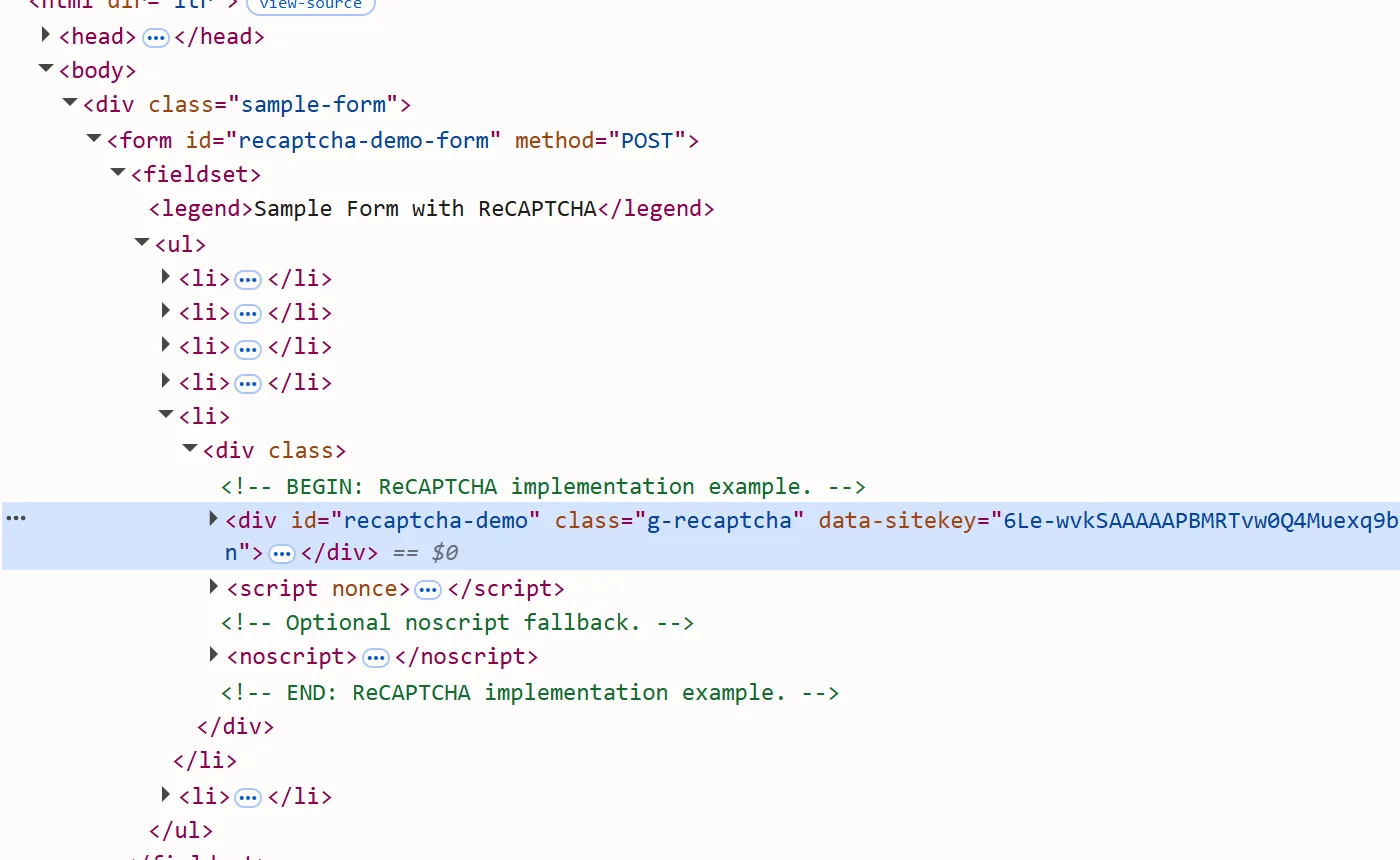
- In the Elements panel press Ctrl+F and search for
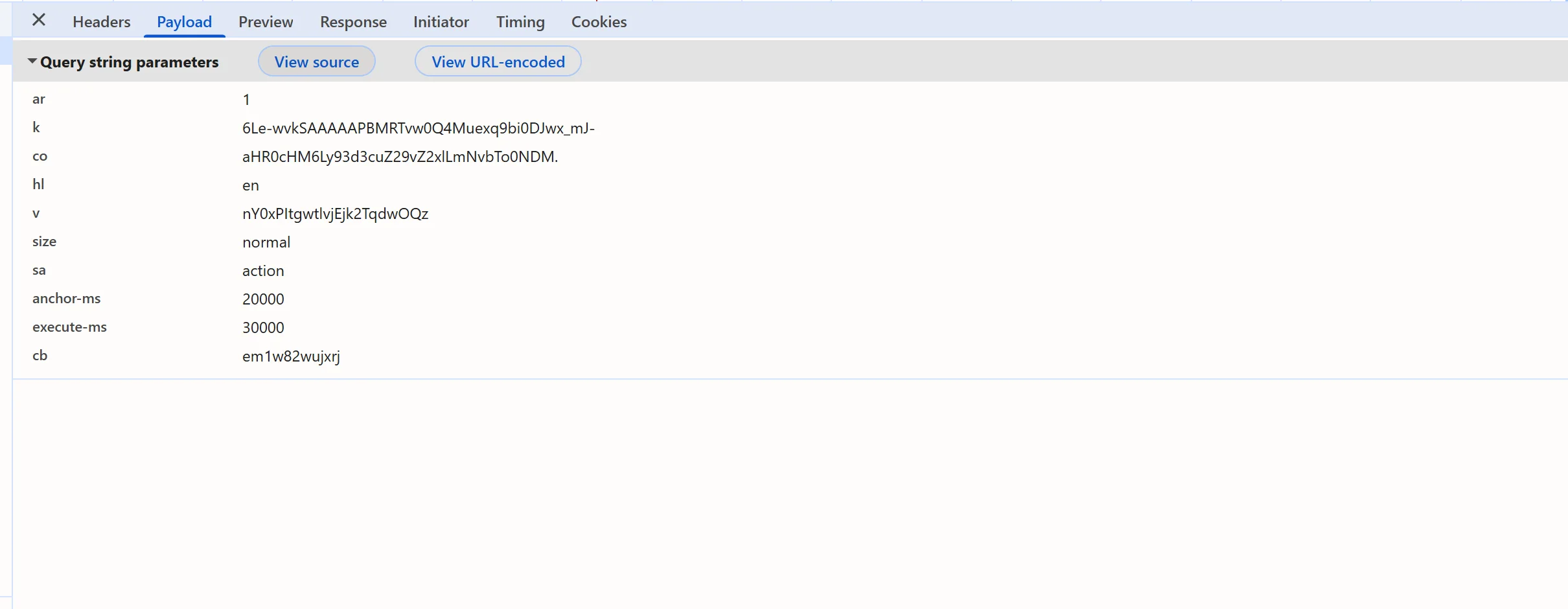
data-sitekey. The value on the widget element (g-recaptcha,cf-turnstile,procaptcha) is the key. CaptchaFox pages may usedata-keyinstead. - If the widget is rendered from JavaScript there is no attribute. Look in the Network tab: for reCAPTCHA open the
anchorrequest and read itskparameter; for MTCaptcha filter forgetchallenge.json, whereskis the key. - For v3, search all files (Ctrl+Shift+F in the Sources panel) for
grecaptcha.execute; the first argument is the key.
This snippet, pasted into the Console, lists every data-sitekey element, the k value of reCAPTCHA iframes and the MTCaptcha key if the page defines one:
const widgets = [...document.querySelectorAll('[data-sitekey], [data-key]')].map((element) => ({
  tag: element.tagName,
  className: element.className,
  sitekey: element.dataset.sitekey ?? element.dataset.key,
}));
const recaptchaFrames = [...document.querySelectorAll('iframe[src*="recaptcha"]')].map((frame) =>
  new URL(frame.src).searchParams.get('k'),
);
console.table(widgets);
console.log('reCAPTCHA iframe k parameters:', recaptchaFrames);
console.log('MTCaptcha sitekey:', window.mtcaptchaConfig?.sitekey);Some types have no site key. Cloudflare Challenge, Akamai and Vercel take the URL; Altcha takes the challenge itself; GeeTest takes captchaId (v4) or a gt and challenge pair (v3).
Capture values that change on every load
Some parameters are generated per render and expire quickly. Copy them from a page you loaded just before creating the task, never from an old session.
- reCAPTCHA Enterprise
s. Search the inline scripts forgrecaptcha.enterprise.render. Thesvalue in its argument goes inenterprisePayload, and it is short-lived. - reCAPTCHA v3 action. The
actioningrecaptcha.execute(key, {action: 'login'})goes inpageAction. It must match exactly. - Turnstile
action,cData,chlPageData. They aredata-actionanddata-cdataattributes or arguments ofturnstile.render. Copy them exactly, and only when the widget declares them. Guessing is worse than omitting. - GeeTest v3
challenge. The page fetches it from the site's own init endpoint on every load. Request it yourself immediately before each task. Thegtkey stays the same. - Altcha challenge. The
GETresponse from the challenge endpoint is the JSON to send aschallengeJSON, or send the URL aschallengeURL. Each challenge is single-use and has an expiry.
For values that only exist inside a script call, set a breakpoint: find the call with global search, click its line number in the Sources panel, reload, and read the arguments in the Scope pane when execution stops. A script that does this for you is more repeatable. The following Playwright script wraps turnstile.render before the page's own scripts run and prints each call's sitekey, action, cData and chlPageData. It also keeps the page's callback in a global so it can be invoked later; the submit guide shows how.
import { chromium } from 'playwright';

const TARGET_URL = process.argv[2];
const CALLS_GLOBAL = '__turnstileCalls';
const CALLBACK_GLOBAL = '__turnstileCallback';
const SETTLE_MS = 5000;

function hookTurnstile({ callsGlobal, callbackGlobal }) {
  let current;
  window[callsGlobal] = [];
  Object.defineProperty(window, 'turnstile', {
    configurable: true,
    get: () => current,
    set: (value) => {
      current = value;
      if (!value || typeof value.render !== 'function') return;
      const render = value.render.bind(value);
      value.render = (container, params) => {
        window[callsGlobal].push({
          sitekey: params?.sitekey,
          action: params?.action,
          cData: params?.cData,
          chlPageData: params?.chlPageData,
        });
        if (typeof params?.callback === 'function') window[callbackGlobal] = params.callback;
        return render(container, params);
      };
    },
  });
}

const browser = await chromium.launch({ headless: false });
const context = await browser.newContext();
await context.addInitScript(hookTurnstile, {
  callsGlobal: CALLS_GLOBAL,
  callbackGlobal: CALLBACK_GLOBAL,
});
const page = await context.newPage();
await page.goto(TARGET_URL);
await page.waitForTimeout(SETTLE_MS);
console.log(await page.evaluate((name) => window[name], CALLS_GLOBAL));
await browser.close();This only sees widgets the page renders with turnstile.render. A widget declared in HTML has its values in the data-* attributes instead. The same pattern works for grecaptcha.execute to log the key and action of a v3 page. For the full Playwright flow see the Playwright recipe.
Common mistakes
- The wrong URL.
websiteURLis the page that renders the widget, not the site root. For a challenge page it is the route that returned the 403. - The iframe URL. For PerimeterX, send the parent page, never an
iframe.hsprotect.netorpx-cdn.netframe URL. - A stale value. If a solve worked once and then fails with the same parameters, re-extract the dynamic ones.
- A key from another page. Keys belong to one widget configuration. A key harvested from site A will not solve site B, and some pages serve a different key per session or page load.
- A development key. Providers publish test keys that always pass. They prove your wiring and nothing else.
Checklist by task type
Names are the real task fields. Anything marked "when present" is optional and should be sent only if the page has it. The full list for each type is in the public catalog, GET /v1/task-types.
| Type | Send | Where it comes from |
|---|---|---|
| reCAPTCHA v2 | websiteURL, websiteKey; isInvisible, enterprisePayload, recaptchaDataSValue, apiDomain when present |
data-sitekey, anchor k, size=invisible, grecaptcha.enterprise.render |
| reCAPTCHA v3 | websiteURL, websiteKey; pageAction, minScore, enterprisePayload when present |
api.js?render=KEY, grecaptcha.execute |
| Turnstile | websiteURL, websiteKey; action, cData, chlPageData when declared |
data-sitekey, turnstile.render arguments |
| Cloudflare Challenge | websiteURL, a proxy; userAgent, html when you have them |
the URL that returns the 403 |
| Vercel | websiteURL, a proxy |
the checkpoint URL |
| FriendlyCaptcha | websiteURL, websiteKey; version, moduleScript, nomoduleScript when present |
data-sitekey, widget script URLs, x-frc-client header |
| Altcha | websiteURL and challengeURL or challengeJSON |
challenge attribute, the challenge response |
| Prosopo | websiteURL, websiteKey |
data-sitekey |
| CaptchaFox | websiteURL, websiteKey, a proxy |
sk_ key in the source or Network |
| GeeTest | websiteURL and either captchaId (v4) or gt plus a fresh challenge (v3) |
initGeetest4 call, init endpoint |
| MTCaptcha | websiteURL, websiteKey; pageAction, isInvisible when present |
sk and act in getchallenge.json |
| Akamai | websiteURL, a proxy |
the protected page |
| DataDome | websiteURL, captchaUrl, a proxy; datadomeCookie when present |
the url in the block response or iframe src |
| PerimeterX | websiteURL, pxAppId, a proxy; uuid, vid, blockData, blockMode, initCookies when present |
_pxAppId, the _pxvid cookie, a captured block page |
Which types need a proxy is on the Proxies guide.
Next steps
Once you know the type and have its parameters, send them to createTask and poll getTaskResult every 3 seconds; the Quickstart has the exact calls. Then deliver the result with the submit guide.