
MTCaptcha is easy to integrate once you know which values the widget was configured with. By the end of this post you will be able to build a correct createTask body, read the verified token from solution.token, and put it into the page before it expires.
What MTCaptcha checks
MTCaptcha runs risk analysis in the background first: fingerprints, behavioural signals and risk scores. Only visitors it finds suspicious get a visible text challenge. The vendor also sells invisible modes, called Low Friction and IP whitelist, where most people never see a widget at all.
What the site receives is a verified token shaped like v1(checksum,customerChecksum,Sitekey,randomSeed,encryptedTokenInfo). The site's server validates it with its secret private key through the vendor's token-check call. A token works once and stays valid for a few minutes. Your solver result is exactly that token, so everything below is about requesting it with the right inputs and delivering it in time.
For recognising the widget and the basics, start with the MTCaptcha solver guide. This post goes deeper into the parameters and the token's lifecycle.
The three parameters you need
| Field | Required | What it is |
|---|---|---|
websiteURL |
yes | The exact URL of the page that hosts the widget |
websiteKey |
yes | The public sitekey, starting with MTPublic- |
pageAction |
only if the site sets one | The act value the widget was initialised with |
Two optional fields exist besides the proxy settings: isInvisible and userAgent.
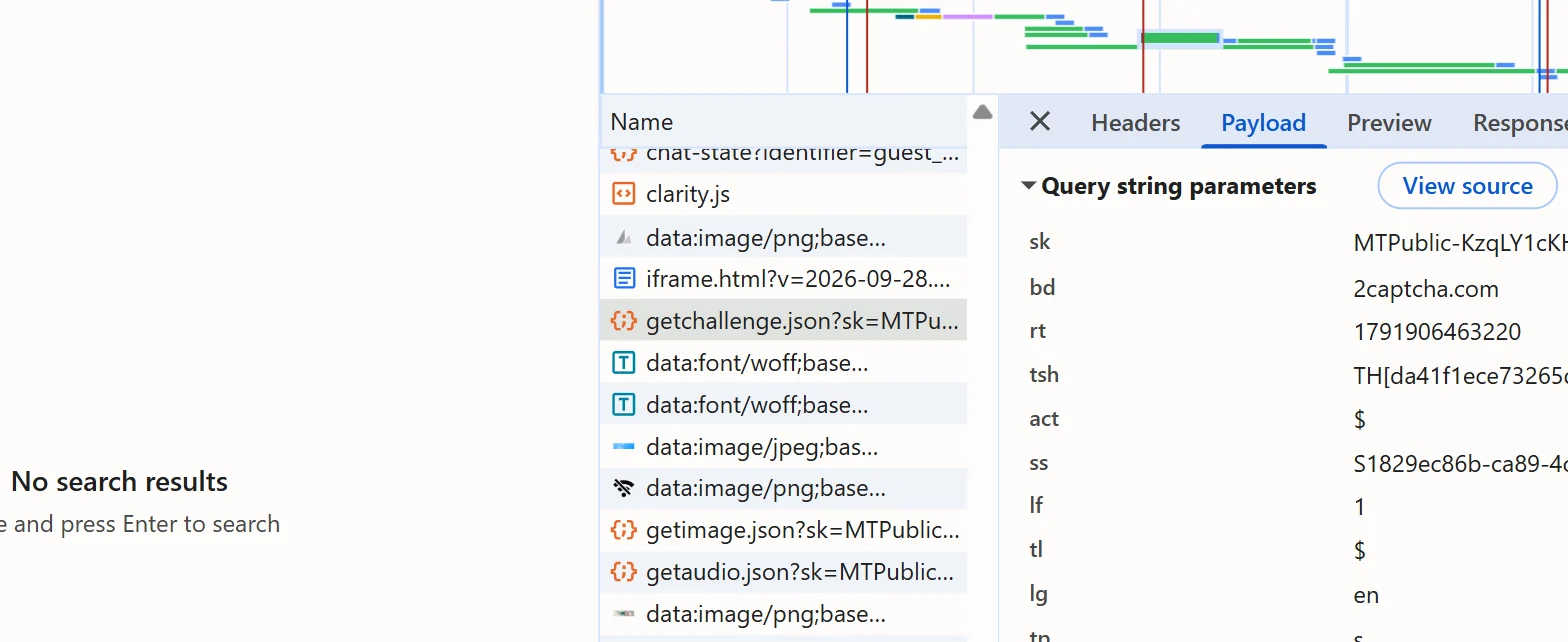
websiteKey is the sk query value of the getchallenge.json request to service.mtcaptcha.com. You can also read it in the console with window.mtcaptchaConfig.sitekey, or from mtcaptchaConfig in the page source.
pageAction is the act value of the same request, or the action entry of mtcaptchaConfig, for example login. When the request shows act=%24, the site uses the default action and you can leave pageAction out. When it shows a custom value, send exactly that. A token issued without the site's custom action carries a mismatched action, and the site's check should reject it.
Set isInvisible: true when the widget has no visible checkbox and works through a hidden field only. Invisible widgets escalate to a visible check when they become suspicious, and marking the mode helps avoid mis-solves.
Use the same task body for a first test against the vendor's public demo page, which has a published demo key:
{
  "clientKey": "YOUR_API_KEY",
  "task": {
    "type": "MtCaptchaTaskProxyLess",
    "websiteURL": "https://service.mtcaptcha.com/mtcv1/demo/index.html",
    "websiteKey": "MTPublic-DemoKey9M"
  }
}Real sites use their own key. Do not reuse the demo key anywhere else.
Proxyless or your own proxy
MtCaptchaTaskProxyLess needs no proxy details and is the default choice. Use MtCaptchaTask when the site rejects tokens solved from provider addresses, or when you want the solve to come from the same exit IP that will submit the form. MtCaptchaToken is also accepted as an alternative name for the same service.
MtCaptchaTask requires proxy details. Without them the request is rejected with ERROR_INVALID_REQUEST. Send task.proxy as a string, for example socks5://user:password@203.0.113.10:1080. A four-part string is always read as user:password:host:port. The split fields proxyType, proxyAddress, proxyPort, proxyLogin and proxyPassword also work, as described in the proxies guide.
The reason to care about the exit IP: MTCaptcha ties a token to a hostname and IP, and the token-check response reports both as tokeninfo.hostname and tokeninfo.ip. Whether a given site compares them is the site owner's choice, so treat an IP mismatch as one suspect when a correct-looking token is refused.
Read solution.token
Create the task, then poll getTaskResult every 3 seconds. While the solver works, the answer is {"errorId":0,"status":"processing"}. When it is done:
{
  "errorId": 0,
  "status": "ready",
  "solution": {
    "token": "v1(00cc43a5,1adfe4b4,MTPublic-DemoKey9M,0080ab49…)"
  }
}solution.token is the verified token, ready to use as it is. A userAgent key can also appear in the solution. It is conditional, so check for it rather than assuming it is there; when it is present, send the request that submits the token with that same user agent.
API errors arrive as HTTP 200 with errorId: 1, an errorCode and an errorDescription. For example, a missing sitekey gives ERROR_INVALID_REQUEST and the description names the field. An unexpected server fault is an HTTP 500 without errorId. Treat both as failures and stop polling; a failed task is final and a retry is a new task.
import time

import requests

API = 'https://api.sursolver.com'
CLIENT_KEY = 'YOUR_API_KEY'
POLL_SECONDS = 3
POLL_ATTEMPTS = 60


def call(path, body):
    response = requests.post(f'{API}{path}', json=body, timeout=30)
    response.raise_for_status()
    data = response.json()
    if data.get('errorId'):
        raise RuntimeError(f"{data['errorCode']}: {data['errorDescription']}")
    return data


def solve_mtcaptcha(page_url, sitekey, page_action=None):
    task = {
        'type': 'MtCaptchaTaskProxyLess',
        'websiteURL': page_url,
        'websiteKey': sitekey,
    }
    if page_action:
        task['pageAction'] = page_action
    created = call('/createTask', {'clientKey': CLIENT_KEY, 'task': task})
    for _ in range(POLL_ATTEMPTS):
        result = call(
            '/getTaskResult',
            {'clientKey': CLIENT_KEY, 'taskId': created['taskId']},
        )
        if result['status'] == 'ready':
            return result['solution']['token']
        time.sleep(POLL_SECONDS)
raise TimeoutError(f"task {created['taskId']} was not ready in {POLL_ATTEMPTS} polls")Inject the verified token
The widget keeps its answer in a hidden form field named mtcaptcha-verifiedtoken, often with an id such as mtcaptcha-verifiedtoken-1. Write the token there and submit the form. The site's own server then checks it.
Order matters because the token is short-lived. Fill in the rest of the form first, request the token last, and submit as soon as it arrives:
from playwright.sync_api import sync_playwright

PAGE_URL = 'https://example.com/login'
SITEKEY = 'MTPublic-abCDEFJAB'
PAGE_ACTION = 'login'  # None when the request shows act=%24

with sync_playwright() as playwright:
    browser = playwright.chromium.launch()
    page = browser.new_page()
    page.goto(PAGE_URL)
    page.fill('input[name="email"]', 'user@example.com')
    page.fill('input[name="password"]', 'correct-horse-battery')

    token = solve_mtcaptcha(PAGE_URL, SITEKEY, PAGE_ACTION)
    page.eval_on_selector(
        'input[name="mtcaptcha-verifiedtoken"]',
        '(el, value) => { el.value = value; }',
        token,
    )
    page.click('button[type="submit"]')
    page.wait_for_load_state()
browser.close()The selectors for the other fields are placeholders; use the ones from your target. If the page reads the token through script instead of the hidden field, the equivalents are mtcaptcha.getVerifiedToken() and the status.verifiedToken value that the widget passes to its verified-callback. See how to submit a captcha token for the general patterns, and the Playwright recipe for the browser setup.
Token lifetime
A token is single-use. It stays valid for a few minutes, and the widget guarantees at least about 50 seconds of server-side validity. Do not solve ahead of time and queue tokens. Solve, submit, and for the next attempt request a new token. Never retry with the previous one.
Keep the vendor's token-check call on the server of the site that owns it. It needs the private key, which only the site owner has, and it must never run in a browser.
Why a token gets rejected
| Cause | What to check |
|---|---|
| Expired or reused token | Submit right after ready; one token per attempt. The site owner sees fail_codes: ["token-expired"] |
Wrong or missing pageAction |
Compare act in getchallenge.json with what you sent |
| Hostname mismatch | websiteURL must be the page that hosts the widget, not another domain |
| IP mismatch | Try MtCaptchaTask with the proxy you submit from |
| Invisible widget | Add isInvisible: true |
| Field not filled | Confirm the hidden mtcaptcha-verifiedtoken input exists when you write to it |
The invisible flag and the IP mismatch are the least certain of these; the sources describe them as likely causes, not guaranteed ones.
Next steps
Create a task with MtCaptchaTaskProxyLess, your websiteURL, the MTPublic- key and, if the site sets one, pageAction. The accepted parameters and result keys are in the public catalog (GET /v1/task-types). A task is charged when createTask accepts it and failed tasks automatically return their original charge once, so confirm the sitekey and action before you scale up; the current price is on the pricing page. To see how the headers around the token matter, read browser headers and user agent for captcha solving.