
An AWS WAF CAPTCHA looks simple: nine pictures, one question. Integrating it is where requests go wrong. Sites that sit behind AWS WAF can answer the same URL with a visual puzzle, a silent browser check or a plain 200, and the correct solver task depends on which one your session gets. This guide covers the whole path with AwsCaptchaCookie: how to read the response, what the 3×3 grid asks, how to create and poll the task, and how to replay aws-waf-token so the next request is not blocked again.
What AWS WAF CAPTCHA is
AWS WAF is a web application firewall that site owners attach to CloudFront, an Application Load Balancer, API Gateway and other AWS front ends. A web ACL rule can use the CAPTCHA action. A request that reaches that rule without a valid token is not forwarded to the application. It receives the CAPTCHA page instead.
The proof that a visitor passed is a cookie called aws-waf-token. After a successful puzzle AWS WAF issues it, and the browser sends it on later requests to the same site. The rule stops challenging the visitor until the token's immunity time runs out. AWS documents the default immunity time as 300 seconds, and site owners can change it per web ACL or rule.
That makes the cookie the only thing your own client needs. The task returns it as solution["aws-waf-token"].
Tell CAPTCHA from Challenge
AWS WAF has two related actions that behave differently on the wire. Check the status code and the x-amzn-waf-action response header before you choose a task.
| Response | x-amzn-waf-action |
What it is | Task |
|---|---|---|---|
| HTTP 405 with an HTML page | captcha |
Visual CAPTCHA, the nine-picture grid | AwsCaptchaCookie (this guide) |
| HTTP 202 with a small script page | challenge |
Silent JavaScript challenge, no puzzle | AwsChallengeCookie |
| HTTP 200 | none | Not blocked for this session | no task needed |
The CAPTCHA page also has a recognisable body. Its HTML defines window.gokuProps with the page's configuration and loads two scripts, challenge.js and captcha.js, from AWS-hosted or first-party paths. A visitor sees a short verification screen with a Begin button and then the image grid.
The silent challenge page loads only challenge.js. If your URL serves that page, AwsCaptchaCookie has nothing to solve and fails instead of claiming a CAPTCHA was completed. The AWS Challenge Playwright guide covers that other contract.
Pass the URL of the page request that received the block, the one a browser would navigate to. A background API call that returns 405 is not a CAPTCHA page, so use the HTML URL the visitor was trying to open.
The action can change with the session
The same site can answer a clean residential session with the silent challenge and a riskier exit IP with the CAPTCHA. That is a rule configuration, not a bug on your side. Observe the response through the proxy you intend to use, because that is the session the solver will start from. Testing from your laptop and then running from a datacenter exit proves nothing about the second one.
What the puzzle asks
The grid is nine square tiles in three rows of three. A line above it names one target category, for example "Choose all the buckets". You select every tile that shows the target and confirm.
Tiles are numbered row by row, starting at 0 in the top-left corner: the top row is 0, 1, 2, the middle row 3, 4, 5 and the bottom row 6, 7, 8. The numbers below were overlaid on a real puzzle for this guide so the answer can be written as a list of indices.
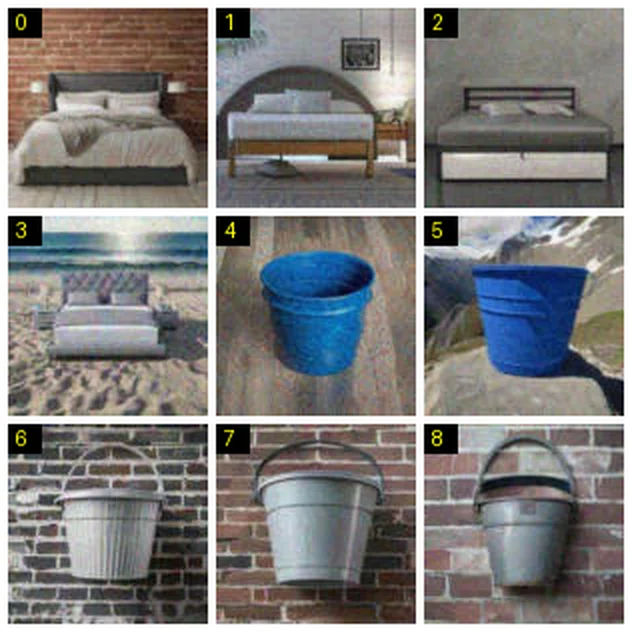
Here tiles 0 to 3 show beds and tiles 4 to 8 show buckets, so the right answer is [4, 5, 6, 7, 8]. Distractors vary between rounds: the same site can ask for clocks, buckets, bags or other everyday objects, and the number of target tiles changes from grid to grid.
AWS also does not always accept the first answer or keep to a single grid. A refused or follow-up submission returns a replacement puzzle, and the page shows it right away.
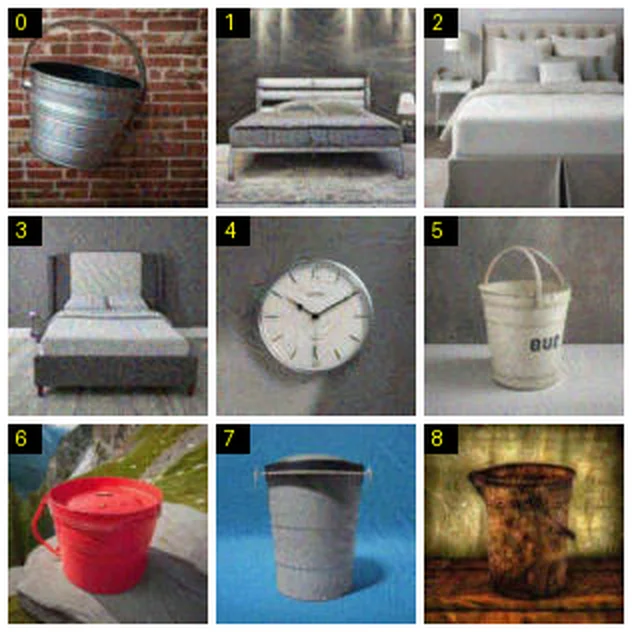
The solver reads each replacement grid and answers it the same way, up to three rounds. The grid can differ completely, so the answer for one round never carries over to the next.
Only single-target 3×3 grids are supported today. A different layout or a puzzle that asks for several categories makes the task fail with a charge refund. It never returns a guess.
Create the task
Send AwsCaptchaCookie with the protected URL, your browser's User-Agent and your proxy. No site key, IV, context or script URL is needed, because the solver reads the CAPTCHA configuration from the page itself.
{
  "clientKey": "sur_xxxxxxxxxxxxxxxxxxxxxxxxxxxxxxxx",
  "task": {
    "type": "AwsCaptchaCookie",
    "websiteURL": "https://shop.example.com/search?q=chairs",
    "userAgent": "Mozilla/5.0 (Windows NT 10.0; Win64; x64) AppleWebKit/537.36 (KHTML, like Gecko) Chrome/155.0.0.0 Safari/537.36",
    "proxy": "http://user:pass@proxy.example.com:8080"
  }
}Three input rules cause most first-run failures:
proxyis mandatory. The CAPTCHA is solved from your exit IP, so a task without proxy details is rejected withERROR_INVALID_REQUESTbefore anything is charged. There is no proxyless variant. Use a sticky session; a rotating pool changes the IP between solving and replay. The proxy guide explains how to choose one.userAgentmust be a supported browser identity. An unsupported value answersERROR_WRONG_USERAGENTand listssupportedUserAgentsin the response. Copy a complete string from that list instead of editing a version number.cookiesis optional. Send it only when the site needs cookies from an existing session to serve the CAPTCHA page. It accepts a Cookie header value or an engine cookie dump.
The API answers with a task ID and nothing else yet:
{ "errorId": 0, "taskId": "tsk_9c1f4e2a7b0d5e3f81a62c47", "status": "idle" }Poll for the result
Call getTaskResult every 3 seconds. An AWS CAPTCHA task has a 120-second budget, which covers loading the page, up to three puzzle rounds and issuing the cookie, so a long wait is normal and not a reason to create a second task.
{ "clientKey": "sur_xxxxxxxxxxxxxxxxxxxxxxxxxxxxxxxx", "taskId": "tsk_9c1f4e2a7b0d5e3f81a62c47" }While the solve runs, status is processing. When it finishes you get ready with the cookie value:
{
  "errorId": 0,
  "status": "ready",
  "solution": {
    "aws-waf-token": "aws-waf-token value, a long opaque string"
  }
}A failure comes back as errorId: 1 with ERROR_FAILED and a description, and a timeout as ERROR_TASK_TIMEOUT. Both return the original charge once. Never poll faster than the interval or open duplicate tasks for the same URL; each accepted task is charged separately.
Replay aws-waf-token
Set solution["aws-waf-token"] as a cookie named aws-waf-token on the protected host, then repeat the blocked request through the same proxy with the same User-Agent. The script below creates the task, waits, preserves the supplied session cookies and checks an application-specific success marker.
# aws-captcha-python.py - solve AWS WAF CAPTCHA and request the protected page with the
# aws-waf-token cookie.
# Install: pip install requests
# Run: python aws-captcha-python.py

import time

import requests


# Your SurSolver API key.
CLIENT_KEY = "sur_xxxxxxxxxxxxxxxxxxxxxxxxxxxxxxxx"
# The protected page that answers with the challenge.
TARGET_URL = "https://example.com/page"
# The proxy for the solve and the replay: http://user:pass@host:port or socks5://host:port.
PROXY_URL = "http://username:password@proxy.example.com:8080"
# Existing session cookies as a Cookie header value (name=value; name2=value2).
SESSION_COOKIES = None
# The User-Agent the solve runs with; send the result with this same user agent.
USER_AGENT = "Mozilla/5.0 (Windows NT 10.0; Win64; x64) AppleWebKit/537.36 (KHTML, like Gecko) Chrome/155.0.0.0 Safari/537.36"
# Text that appears only in a response the site accepted.
SUCCESS_TEXT = "PASTE_ACCEPTED_MARKER"


API = "https://api.sursolver.com"
POLL_ATTEMPTS = 60


def call(path, body):
    # API errors are HTTP 200 with errorId 1; anything else is a transport failure.
    response = requests.post(f"{API}{path}", json=body, timeout=30)
    response.raise_for_status()
    data = response.json()
    if data["errorId"] != 0:
        raise RuntimeError(f'{data["errorCode"]}: {data["errorDescription"]}')
    return data


def solve(task):
    created = call("/createTask", {"clientKey": CLIENT_KEY, "task": task})
    for _ in range(POLL_ATTEMPTS):
        result = call("/getTaskResult", {"clientKey": CLIENT_KEY, "taskId": created["taskId"]})
        if result["status"] == "ready":
            return result["solution"]
        time.sleep(3)
    raise TimeoutError(f'task {created["taskId"]} was not ready in {POLL_ATTEMPTS} polls')


def without_empty(fields):
    # Optional task fields are sent only when they have a value.
    return {name: value for name, value in fields.items() if value not in (None, "")}


PROXIES = {"http": PROXY_URL, "https": PROXY_URL}


def main():
    solution = solve({
        "type": "AwsCaptchaCookie",
        "websiteURL": TARGET_URL,
        "userAgent": USER_AGENT,
        **without_empty({
            "cookies": SESSION_COOKIES,
        }),
        "proxy": PROXY_URL,
    })

    # Replay with the user agent the solve ran with, through the same proxy.
    headers = {"User-Agent": USER_AGENT}
    cookies = dict(part.strip().split("=", 1) for part in (SESSION_COOKIES or "").split(";")
                   if "=" in part)
    cookies["aws-waf-token"] = solution["aws-waf-token"]
    cookies = {
        **cookies,
        **solution.get("cookies", {}),
        "aws-waf-token": solution["aws-waf-token"],
    }
    response = requests.get(
        TARGET_URL,
        headers=headers,
        cookies=cookies,
        proxies=PROXIES,
        timeout=30,
    )
    if not response.ok or SUCCESS_TEXT not in response.text:
        raise SystemExit(f"The site did not accept the result (HTTP {response.status_code}).")
    print("The site accepted the result.")


if __name__ == "__main__":
main()Check both the WAF response and an application-specific success marker; status 200 alone is not sufficient. The cookie proves that the CAPTCHA was completed. It does not make a non-browser client look like Chrome, so if other bot rules block the same session, replay from a real browser context instead. The Playwright recipe shows how to add a cookie to a context before navigation.
Token lifetime and reuse
aws-waf-token is valid for the site's immunity time, which is 300 seconds by default. After that the rule challenges the session again, even when your cookies still contain the old value. Solve close to the moment you need the session and reuse the one cookie for every request in that window rather than solving per request.
Other limits are about identity, not time:
- The token was issued to one exit IP and one User-Agent. A different IP or a rotated proxy session invites a second CAPTCHA.
- The cookie is scoped to the host that set it. Set it on the same hostname you request.
- A token for one site's web ACL is useless on another site.
- A passed CAPTCHA does not authenticate you. The application's own login, CSRF and session cookies still apply.
Why you still get 405 after replay
When the replayed request is blocked again, work down this list before you create another task.
| Symptom | Likely cause | What to check |
|---|---|---|
| 405 again right away | The cookie was not sent | The cookie's domain must match the request host exactly, and the name must be aws-waf-token |
| 405 after a few minutes | Immunity time ended | Solve again; reuse one token for a burst of requests |
| 405 from a different IP | Proxy rotated between task and replay | Use one sticky session for both |
| 202 instead of 405 | The rule serves the silent challenge here | Switch to AwsChallengeCookie with the site's challenge.js URL |
Task ends as ERROR_FAILED |
The URL did not serve the CAPTCHA page, the grid layout is unsupported, or the rounds ran out | Re-capture the response through your proxy and read status plus x-amzn-waf-action; the charge is refunded once |
| 403 or a login redirect | Another rule or the application is blocking you | The WAF cookie does not cover authentication or other bot rules |
Checklist before you ship
- Log the status code and
x-amzn-waf-actionof the blocked response, through your production proxy. - Use
AwsCaptchaCookieonly for 405 +captcha, andAwsChallengeCookiefor 202 +challenge. - Send a sticky proxy and a complete User-Agent from
supportedUserAgents. - Poll every 3 seconds for up to 130 seconds, and never create a second task while the first is processing.
- Set
aws-waf-tokenon the exact request host and replay through the same proxy and User-Agent. - Solve again when the immunity time is over instead of caching the token longer.
The AWS WAF CAPTCHA solver page lists the task fields at a glance. The API reference has the request and result schemas, and How to submit a captcha token compares cookie replay with form and callback submission.
Current input and replay contract
AwsCaptchaCookie requires the actual CAPTCHA-protected websiteURL, userAgent and your proxy. Existing session cookies are optional. No script URL, site key, IV or context field is required: the native flow discovers the visual CAPTCHA itself.
The current visual integration supports single-target 3×3 image-selection grids. A silent challenge, another layout or a multi-target puzzle must not be presented as a completed CAPTCHA. Poll the same task within its 120-second budget rather than creating duplicate requests. Replay solution["aws-waf-token"] as the aws-waf-token cookie, preserving session cookies and using the same proxy and User-Agent. Check application acceptance as well as HTTP status. See the complete visual CAPTCHA guide.