
This guide walks you through one CaptchaFox solve from start to finish. You will find the sk_ sitekey, create a CaptchaFoxTask that carries your proxy, poll for the token and submit it in cf-captcha-response from the same IP. The code is Python with requests and Playwright, written against the SurSolver API.
The point to keep in mind throughout: a CaptchaFox token is bound to the IP that solved it. Everything below, from the task to the form submission, is organised around keeping one proxy session constant.
What you get back
CaptchaFox is a privacy-first, behavioural captcha built and hosted in Europe. It scores cursor movement, click timing and scroll patterns together with technical signals and network context, and shows a visible challenge only to suspicious sessions: a slide puzzle, a one-click confirmation or an audio fallback.
A page that uses it loads cdn.captchafox.com/api.js and has a container such as <div class="captchafox" data-sitekey="...">. On success the widget adds a hidden input with the response token, submitted as the POST field cf-captcha-response. The site then verifies the token server-side, optionally together with the IP it came from.
A solved task returns a token string, plus userAgent when the solver reported one. The user agent is conditional, so read it with a default. The token is single-use and short-lived. The CaptchaFox solver guide covers how to recognise the widget.
The script host is not a task parameter
Some sites load the widget from a different script host. United Internet properties such as mail.com, gmx.com and web.de use a dedicated host under s.uicdn.com, and their tokens carry a MAM_ prefix. Some other solvers expose an apiServer field to select that host. The SurSolver task has no such parameter; it takes the website URL, the sitekey and a proxy, plus an optional user agent.
So view the page source before you spend a task: if the widget's <script src> points at cdn.captchafox.com, the task targets your site. If it points elsewhere, a standard token may be rejected, and SurSolver has no setting to change that.
Parameters
| Field | Required | What it is |
|---|---|---|
type |
yes | CaptchaFoxTask; CaptchaFoxToken is accepted as another spelling |
websiteURL |
yes | The exact page that shows the widget |
websiteKey |
yes | The sitekey, which starts with sk_ |
proxy |
yes | Your proxy, as a string or as split fields |
userAgent |
no | The user agent of the browser that will submit the token |
CaptchaFox has no proxyless name. CaptchaFoxTaskProxyLess answers ERROR_TYPE_NOT_SUPPORTED, and a task without proxy details is rejected with ERROR_INVALID_REQUEST.
The proxy goes in task.proxy, for example http://user:password@203.0.113.10:8000. A string with four colon-separated parts is always read as user:password:host:port. Split fields (proxyType, proxyAddress, proxyPort, proxyLogin, proxyPassword) are the explicit alternative; the proxies guide lists every format.
Find the sitekey
CaptchaFox sitekeys start with sk_. Try these in order:
- Page source. Press Ctrl+U and search for
captchafox,sk_,data-keyorCaptchaFox.init. Look for a container withdata-sitekeyordata-key, or aCaptchaFox.init({ key: "sk_..." })call. - Network tab. This is the most reliable method. Open DevTools, reload, filter requests by
captchafoxorchallenge, and read thekeyfrom the query parameters or the response. - Console. Try
document.querySelector('[data-key]')?.dataset.key.
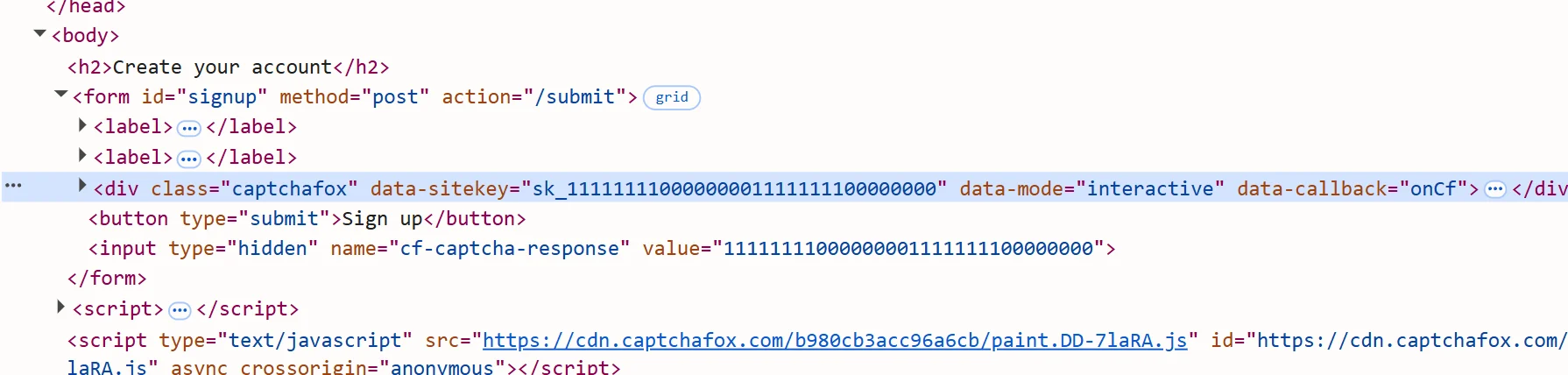
On some sites the key changes per session or page load. If a setup that worked starts failing, read the key again from a fresh page load before you suspect anything else. Identify any captcha and extract its parameters covers the general method.
Create the task and poll
curl -sS -X POST "https://api.sursolver.com/createTask" \
  -H "Content-Type: application/json" \
  -d '{
    "clientKey": "YOUR_API_KEY",
    "task": {
      "type": "CaptchaFoxTask",
      "websiteURL": "https://www.example.com/signup",
      "websiteKey": "sk_YOUR_SITEKEY",
      "proxy": "http://user:password@203.0.113.10:8000"
    }
}'An accepted task answers:
{"errorId":0,"taskId":"tsk_9c1f4e2a7b0d5e3f81a62c47","status":"idle"}Poll getTaskResult every 3 seconds. {"errorId":0,"status":"processing"} means keep waiting. When the task is done:
{
  "errorId": 0,
  "status": "ready",
  "solution": {
    "token": "7828075fb55ecbd9146745ee6f2bec475b88076d36e23050f1fb28359ffca15d",
    "userAgent": "Mozilla/5.0 ..."
  }
}API errors are HTTP 200 with errorId: 1; stop polling at the first one. An unexpected server fault is an HTTP 500 without errorId. The API sets no polling ceiling, so add a deadline in your own loop. Tokens live only a few minutes, so a short deadline is fine.
Submit cf-captcha-response
On a standard integration the token goes into the POST field cf-captcha-response, and the site verifies it with CaptchaFox. Custom integrations rename it. Complete the captcha once by hand and read the request in the Network tab: observed variants include cf_token, captcha_response, captchafox_token, a header such as X-Captcha-Token, or a field inside a JSON body. Use whatever the site's own request uses. How to submit a captcha token goes through the patterns.
Three conditions have to hold at submission:
- Same IP. Send the request through the proxy you gave the task. If the IPs differ, the site's verification fails with
invalid-ip-match. - Same user agent. When the solution includes
userAgent, submit with it. When it does not, the result does not say which browser the solve presented; use your client's own user agent and confirm the first submission is accepted before scaling up. - Straight away. The token is single-use and expires within minutes. A replay or a late submit comes back as
timeout-or-duplicate.
Python and Playwright examples
This script solves the task and submits the form with an HTTP client that uses the same proxy:
import os
import time

import requests

API = 'https://api.sursolver.com'
API_KEY = os.environ['SURSOLVER_API_KEY']
PAGE_URL = 'https://www.example.com/signup'
SUBMIT_URL = 'https://www.example.com/signup'
SITEKEY = 'sk_YOUR_SITEKEY'
PROXY_USER = 'user'
PROXY_PASSWORD = 'password'
PROXY_HOST = '203.0.113.10'
PROXY_PORT = 8000
PROXY_URL = f'http://{PROXY_USER}:{PROXY_PASSWORD}@{PROXY_HOST}:{PROXY_PORT}'
DEFAULT_USER_AGENT = (
    'Mozilla/5.0 (Windows NT 10.0; Win64; x64) AppleWebKit/537.36 '
    '(KHTML, like Gecko) Chrome/144.0.0.0 Safari/537.36'
)
POLL_SECONDS = 3
DEADLINE_SECONDS = 180  # client-side limit, the API does not set one


def call(path, body):
    res = requests.post(f'{API}{path}', json={'clientKey': API_KEY, **body}, timeout=30)
    res.raise_for_status()  # HTTP 500 has no errorId: a server fault
    data = res.json()
    if data.get('errorId') != 0:
        raise RuntimeError(f"{data.get('errorCode')}: {data.get('errorDescription')}")
    return data


def solve_captchafox():
    created = call('/createTask', {'task': {
        'type': 'CaptchaFoxTask',
        'websiteURL': PAGE_URL,
        'websiteKey': SITEKEY,
        'proxy': PROXY_URL,
        'userAgent': DEFAULT_USER_AGENT,
    }})
    task_id = created['taskId']
    deadline = time.monotonic() + DEADLINE_SECONDS
    while time.monotonic() < deadline:
        time.sleep(POLL_SECONDS)
        result = call('/getTaskResult', {'taskId': task_id})
        if result['status'] == 'ready':
            return result['solution']
    raise TimeoutError(f'task {task_id} still processing after {DEADLINE_SECONDS}s')


solution = solve_captchafox()
user_agent = solution.get('userAgent', DEFAULT_USER_AGENT)

session = requests.Session()
session.proxies = {'http': PROXY_URL, 'https': PROXY_URL}
response = session.post(
    SUBMIT_URL,
    headers={'User-Agent': user_agent},
    data={'email': 'user@example.com', 'cf-captcha-response': solution['token']},
    timeout=30,
)
print(response.status_code)If the form needs a real browser, launch Chromium through the same proxy. This continues the script above and reuses solve_captchafox:
from playwright.sync_api import sync_playwright

SET_TOKEN = """(token) => {
  const form = document.querySelector('form');
  let field = form.querySelector('[name="cf-captcha-response"]');
  if (!field) {
    field = document.createElement('input');
    field.type = 'hidden';
    field.name = 'cf-captcha-response';
    form.appendChild(field);
  }
  field.value = token;
}"""

solution = solve_captchafox()

with sync_playwright() as p:
    browser = p.chromium.launch(proxy={
        'server': f'http://{PROXY_HOST}:{PROXY_PORT}',
        'username': PROXY_USER,
        'password': PROXY_PASSWORD,
    })
    context = browser.new_context(user_agent=solution.get('userAgent', DEFAULT_USER_AGENT))
    page = context.new_page()
    page.goto(PAGE_URL)
    page.evaluate(SET_TOKEN, solution['token'])
    page.click('form [type="submit"]')
    page.wait_for_load_state('networkidle')
    print(page.url)
browser.close()Both scripts assume a plain form field. If your target reads the token from a header or JSON body, change only the submit step. The Playwright recipe shows how.
Why a valid token gets rejected
A task that finishes with errorId: 0 and a token that the site refuses is almost always a context mismatch. Work through this list:
- Different IP at submit time. Route the submission through the task's proxy, for browsers and HTTP clients alike.
- A proxy that rotates. Use one sticky session that lasts at least five minutes, and one session per solve. A proxy that changes exit IP on every request breaks the match.
- A user agent that differs from the one in the solution, or from the
userAgentyou sent. - A stale or replayed token. Poll, then submit immediately.
- The wrong field. If
cf-captcha-responsedoes nothing, sniff the real name from a manual solve. - A stale sitekey. Read it again from a fresh page load.
- A different script host. If the page loads the widget from a host other than
cdn.captchafox.com, the token may not be accepted, as described earlier.
Pick a proxy in a country that suits the target. The proxies post covers sticky sessions and proxy types, and the user agent and headers post covers the header side.
What it costs
A task is charged when createTask accepts it, and a successful task keeps its charge. A task that finishes as failed automatically returns its original charge once, and a retry is a new task with a new charge, so fix the mismatch before you loop. Prices are on the pricing page; Billing & packages explains the rules, and volume pricing goes through support.
Next steps
Check the widget's script host, grab the sk_ key and pick a sticky proxy session. Then send one CaptchaFoxTask with the parameters listed by the public catalog (GET /v1/task-types) and submit the result through the same proxy. If you also work with Procaptcha, the Prosopo guide follows the same flow without the mandatory proxy.