
By the end of this guide you will be able to tell a DataDome block from other anti-bot walls, take the challenge URL out of the response, call createTask with DatadomeSliderTask, and replay the returned cookie.
What DataDome gives you back
DataDome scores each request with IP reputation, TLS and HTTP/2 fingerprints, browser fingerprinting, behaviour and per-customer models. Most visitors never see it; a suspicious one gets a device-check interstitial or a slider.
A solve does not produce a form token. It produces a cookie: a validated datadome value bound to the exit IP and the fingerprint it was earned with. That is why the proxy and the user agent matter more here than the challenge itself. A shorter overview is on the DataDome solver page.
With SurSolver the result has three keys. cookies is an array of { name, value, domain?, path? } objects and is what you replay. token and userAgent appear only when the solver reports them. Some other solver APIs return a full Set-Cookie string, a bare value or a map per domain, so code written for them will not read this response unchanged: loop over cookies.
Fingerprint cheat-sheet
These markers identify DataDome. Look for them in the blocked response and in the DevTools Network and Application panels.
| Marker | Where you see it | What it tells you |
|---|---|---|
datadome cookie on the response |
Set-Cookie header, Application → Cookies |
DataDome is in front of the site |
HTTP 403 with a small HTML body containing var dd |
Page request | A block on a page |
JSON body { "url": "https://geo.captcha-delivery.com/..." } |
XHR or API endpoint | The same block, for an API call; url is the challenge URL |
Challenge URL path /captcha/ |
JSON url, iframe src |
Slider |
Challenge URL path /interstitial/ |
JSON url, iframe src |
Device check, no puzzle |
rt:'c' and c.js inside var dd |
Block page source | Slider |
rt:'i' and i.js inside var dd |
Block page source | Interstitial |
t=fe or t=bv in the challenge URL |
Query string | fe: solvable. bv: your IP is banned |
tags.js, often https://js.datadome.co/tags.js or a custom domain |
Script tag in the page | Telemetry script; it runs before any block |
window.ddjskey, window.ddoptions |
DevTools console | Per-site configuration for that telemetry script |

The var dd object carries the fields cid, hsh, t, s, e, rt and, on interstitials, b. A commonly used way to read it is to take the text after var dd=, swap single quotes for double quotes and parse it as JSON. The function below does that and also reads the url from a JSON block:
import json
import re
from html import unescape
from urllib.parse import parse_qs, urlparse

CHALLENGE_HOST = 'captcha-delivery.com'
DD_OBJECT = re.compile(r'var\s+dd\s*=\s*(\{.*?\})', re.DOTALL)
IFRAME_SRC = re.compile(
    r'''src=["'](https://[^"']*captcha-delivery\.com/(?:captcha|interstitial)/[^"']*)["']'''
)


def find_challenge_url(body):
    try:
        data = json.loads(body)
    except ValueError:
        data = None
    if isinstance(data, dict) and isinstance(data.get('url'), str):
        url = data['url']
        return url if CHALLENGE_HOST in urlparse(url).netloc else None
    match = IFRAME_SRC.search(body)
    return unescape(match.group(1)) if match else None


def parse_dd(body):
    match = DD_OBJECT.search(body)
    if not match:
        return None
    try:
        return json.loads(match.group(1).replace("'", '"'))
    except ValueError:
        return None


def read_datadome_block(body):
    """Describe a DataDome block, or return None when the body is not one."""
    challenge_url = find_challenge_url(body)
    dd = parse_dd(body)
    if challenge_url is None and dd is None:
        return None
    if challenge_url:
        kind = 'interstitial' if '/interstitial/' in challenge_url else 'slider'
        t_value = parse_qs(urlparse(challenge_url).query).get('t', [None])[0]
    else:
        kind = {'c': 'slider', 'i': 'interstitial'}.get(dd.get('rt'), 'unknown')
        t_value = dd.get('t')
return {'kind': kind, 'challenge_url': challenge_url, 'ip_banned': t_value == 'bv'}Which layer is blocking you
A solve only helps at one layer of the stack. The table maps what you observe to the layer and to the action that fits.
| What you observe | Layer | Does a solve help? | What to do |
|---|---|---|---|
t=bv in the challenge URL |
IP reputation | No | Change the proxy IP, trigger the block again and extract fresh values |
/captcha/ URL with t=fe |
Slider challenge | Yes | Send DatadomeSliderTask |
/interstitial/ URL |
Device check | Not documented | See the note below the table |
| Cookie returned, replay still gets 403 | Client TLS, headers | No | Paste a cookie copied from a real browser into your client; if that also gets 403, fix the client |
| Blocked on the first request from a datacenter range | IP type | No | Use a sticky residential or mobile proxy |
| Your own automation drags the slider and fails | Behaviour | No | The slider measures mouse, touch and timing, not only the end position; send the task to the API instead |
SurSolver documents one DataDome task type, DatadomeSliderTask. The documentation does not describe interstitial URLs or a separate tags task, so if your target serves /interstitial/, ask support before you build on it. If an interstitial escalates, the next challenge URL has a /captcha/ path and is a slider.
Collect the parameters
DatadomeSliderTask takes two required values, the proxy, and two optional ones.
| Field | Required | What to send |
|---|---|---|
websiteURL |
Yes | The full URL of the blocked page |
captchaUrl |
Yes | The full captcha-delivery.com challenge URL with its session parameters |
proxyType, proxyAddress, proxyPort, proxyLogin, proxyPassword |
Yes | A sticky proxy; there is no proxyless form. The proxy guide lists the string and split formats |
userAgent |
No | The user agent of the session that got blocked |
datadomeCookie |
No | The current, blocked datadome cookie value |
Load the protected page through the proxy and with the user agent you will replay with, and check the t value first. Take captchaUrl verbatim from the JSON url or from the challenge iframe src. If the 403 page only contains var dd, other solver providers document building the URL from its fields: cid becomes initialCid, hsh becomes hash, the current datadome cookie becomes cid, and t, s and e carry over. The full page URL goes in as referer, percent-encoded. Compare your result with the iframe src of a real browser before you send it.
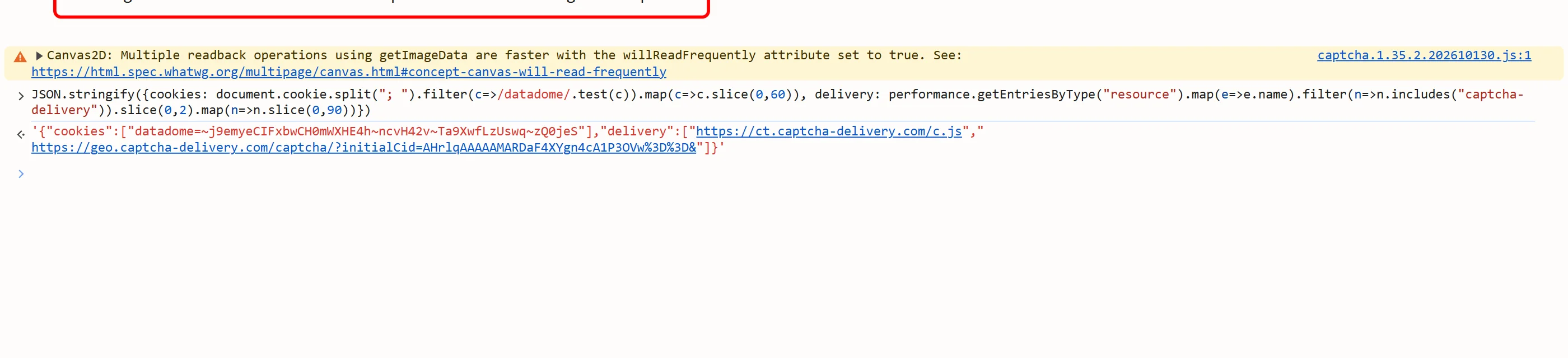
Read the blocked datadome cookie from Application → Cookies or from the Set-Cookie header of the 403. Extract every value right before createTask; they are dynamic per render. The general parameter-hunting guide covers the DevTools workflow.
Create the task and replay the cookie
This script triggers the block, solves it and replays the cookie. It uses read_datadome_block from above. Replace the placeholders with your own values.
import time
from urllib.parse import urlparse

import requests

API = 'https://api.sursolver.com'
CLIENT_KEY = 'YOUR_API_KEY'
PAGE_URL = 'https://www.example.com/products'
USER_AGENT = 'YOUR_BROWSER_USER_AGENT'
PROXY = {
    'proxyType': 'http',
    'proxyAddress': 'proxy.example.com',
    'proxyPort': 8000,
    'proxyLogin': 'YOUR_PROXY_LOGIN',
    'proxyPassword': 'YOUR_PROXY_PASSWORD',
}
POLL_SECONDS = 3
POLL_ATTEMPTS = 60
REQUEST_TIMEOUT = 30


def call(path, body):
    # API errors are HTTP 200 with errorId 1; anything else is a transport failure.
    response = requests.post(f'{API}{path}', json=body, timeout=REQUEST_TIMEOUT)
    response.raise_for_status()
    data = response.json()
    if data['errorId'] != 0:
        raise RuntimeError(f"{data['errorCode']}: {data['errorDescription']}")
    return data


def solve_datadome(challenge_url):
    task = {
        'type': 'DatadomeSliderTask',
        'websiteURL': PAGE_URL,
        'captchaUrl': challenge_url,
        'userAgent': USER_AGENT,
        **PROXY,
    }
    created = call('/createTask', {'clientKey': CLIENT_KEY, 'task': task})
    for _ in range(POLL_ATTEMPTS):
        result = call('/getTaskResult', {'clientKey': CLIENT_KEY, 'taskId': created['taskId']})
        if result['status'] == 'ready':
            return result['solution']
        time.sleep(POLL_SECONDS)
    raise TimeoutError(f"task {created['taskId']} was not ready in {POLL_ATTEMPTS} polls")


proxy_url = (
    f"{PROXY['proxyType']}://{PROXY['proxyLogin']}:{PROXY['proxyPassword']}"
    f"@{PROXY['proxyAddress']}:{PROXY['proxyPort']}"
)
session = requests.Session()
session.proxies.update({'http': proxy_url, 'https': proxy_url})
session.headers['User-Agent'] = USER_AGENT

first = session.get(PAGE_URL, timeout=REQUEST_TIMEOUT)
if first.status_code != 403:
    print('not blocked:', first.status_code)
    raise SystemExit(0)

block = read_datadome_block(first.text)
if block is None:
    raise SystemExit('the 403 is not a DataDome block')
if block['ip_banned']:
    raise SystemExit('t=bv: change the proxy IP and trigger the block again')
if block['challenge_url'] is None:
    raise SystemExit('no challenge URL in the block; build it from var dd first')

solution = solve_datadome(block['challenge_url'])
host = urlparse(PAGE_URL).hostname
for cookie in solution['cookies']:
    session.cookies.set(
        cookie['name'],
        cookie['value'],
        domain=cookie.get('domain') or host,
        path=cookie.get('path') or '/',
    )
if solution.get('userAgent'):
    session.headers['User-Agent'] = solution['userAgent']

second = session.get(PAGE_URL, timeout=REQUEST_TIMEOUT)
print('replay status:', second.status_code)userAgent in the solution is conditional, so the script keeps your own user agent when it is absent. requests also has its own TLS and header fingerprint: if the replay returns 403 with a fresh cookie, test the same cookie in a real browser before you suspect the solve.
Replay rules
- Use the same sticky proxy and the same user agent for the block, the solve and the replay. A rotating proxy breaks the chain, and datacenter addresses are frequently blocked. See proxies for captcha solving.
- Header order, TLS fingerprint and, for regional sites,
Accept-Languageshould match what a real browser sends for that user agent. See browser headers and user agents. - Reuse the cookie instead of solving on every request. One solver provider's documentation puts its effective lifetime at about an hour per origin and device fingerprint; no second source states a lifetime, so treat that as a rough guide. Solve again when the site blocks you.
- Each accepted task is charged and a task that finishes as failed automatically returns its original charge once, so reusing a working cookie also saves money (billing).
Common failures
| Symptom | Likely cause | Fix |
|---|---|---|
ERROR_FAILED while polling |
The solve failed; the error description gives the reason | The task was charged and is final. Check the proxy, user agent and challenge URL, then submit a new task |
ERROR_INVALID_REQUEST |
A required field is missing or malformed, or the proxy is in an unreadable format | The description names the field. Nothing was charged |
ERROR_NO_SLOT_AVAILABLE |
Rate limit or queue admission | Wait for the (retry in Ns) hint and retry with jitter |
HTTP 500 without errorId |
Unexpected fault | Check /getBalance before resubmitting, since a retried createTask is a new charged task |
Next steps
Create an API key in the dashboard, trigger a block from your own sticky proxy, and send the challenge URL with DatadomeSliderTask in one createTask call. The accepted parameters are listed by the public catalog (GET /v1/task-types), and polling and failure handling are in the task lifecycle guide. If your target uses PerimeterX instead, the matching guide is PerimeterX bypass.