
By the end of this post you will be able to read the sitekey and widget version off a page that uses Friendly Captcha, create a task for it, and submit the returned token in the field the site expects, with the widget script kept out of the way. The overview of the captcha itself is on the Friendly Captcha solver page; this post goes deep on the request, the two widget versions and the injection step.
What the solve returns
Friendly Captcha does not show an image or a checkbox. The visitor's browser computes a cryptographic proof-of-work puzzle in the background and the widget turns the result into a token. So the thing you buy from a solver is that token: a single string.
The solution of a finished task has two keys. token is always there. userAgent is conditional: it appears when the solver reports the user agent it used, so read it with a default instead of assuming it exists. There is no puzzle and no challenge payload to relay anywhere.
The site checks the token on its own server. Treat a token as bound to the sitekey and the site it was created for, and as single-use: put it into the request that submits the form right away, and never reuse it.
Version 1 and version 2
The widget exists in two generations. They load different script files, write the token into differently named fields and produce differently shaped tokens, so you have to know which one the page runs before you place anything.
| v1 | v2 | |
|---|---|---|
| Script file | widget.module.min.js or widget.min.js, under friendly-challenge@X.Y.Z/ |
site.min.js, under @friendlycaptcha/sdk@X.Y.Z/ |
| Default token field | frc-captcha-solution |
frc-captcha-response |
| Sitekey visible in | data-sitekey and the puzzle?sitekey= request |
data-sitekey, or the page source and network traffic |
A v1 token in the v2 field, or the other way round, fails. The version in X.Y.Z is the client version sent in the x-frc-client request header of the widget's own requests.
Find the sitekey and script URLs
Open the page in your browser, then open DevTools.
- In the Elements panel, search for
data-sitekey. The widget element carries the sitekey in that attribute. - In the Network tab, look for the widget script.
widget.module.min.jsorwidget.min.jsmeans v1,site.min.jsmeans v2. Copy the full script URL. - On v1 you can also filter for
puzzle?sitekey=and read the sitekey from that request. Open any widget request and read thex-frc-clientheader for the version number. - Copy the page URL from the address bar, including the exact path of the form. That is
websiteURL.
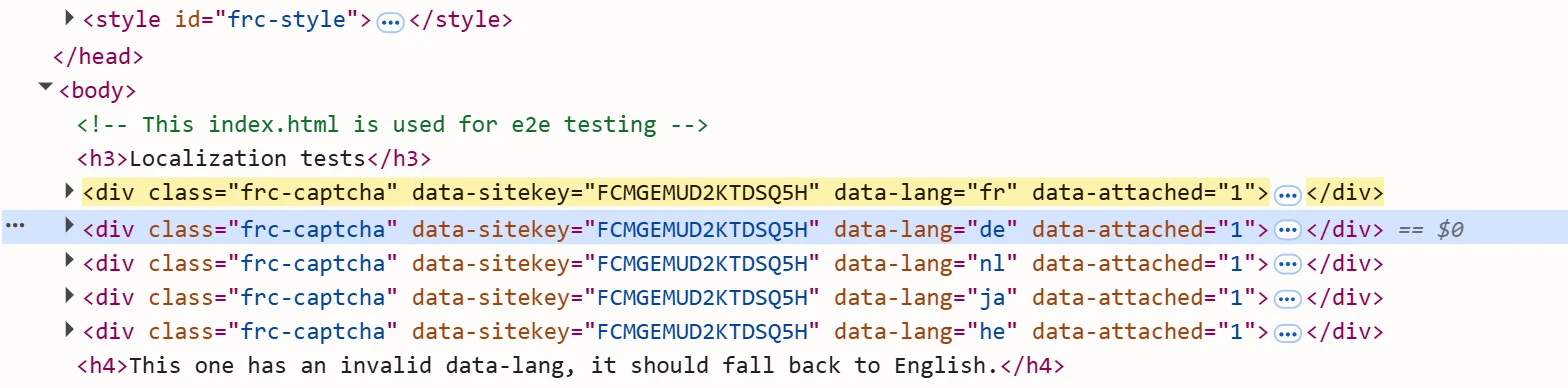
Copy the script URL from the live page. A URL typed from memory or taken from an old cache can point at a different version than the page really loads. The optional moduleScript and nomoduleScript fields take these URLs: the module script and the legacy non-module fallback that sits next to it in the page source.
If you are unsure which of the two widgets a site runs, identify the captcha and extract its parameters walks through the DevTools routine for every type.
Send the first request
The default task name is FriendlyCaptchaTaskProxyless. It needs websiteURL and websiteKey; version, moduleScript, nomoduleScript and userAgent are optional. The public catalog (GET /v1/task-types) does not state a default for version, so send it when you know it.
curl -s -X POST https://api.sursolver.com/createTask \
  -H 'content-type: application/json' \
  -d '{
    "clientKey": "YOUR_API_KEY",
    "task": {
      "type": "FriendlyCaptchaTaskProxyless",
      "websiteURL": "https://example.com/signup",
      "websiteKey": "FCMGD8BOO9CFF3RA",
      "version": "v2"
    }
}'An accepted task answers with an id and idle:
{ "errorId": 0, "taskId": "tsk_9c1f4e2a7b0d5e3f81a62c47", "status": "idle" }FriendlyCaptchaToken is accepted as an alias of the same task. Every parameter is listed by the public catalog (GET /v1/task-types).
Use the proxy variant only when needed
Start with the proxyless name. It needs nothing but the page URL and the sitekey, and a proxy adds cost and moving parts.
If the site refuses tokens that were solved without a proxy, switch the type to FriendlyCaptchaTask and pass your own proxy in task.proxy. That name requires proxy details: a request without them is rejected with ERROR_INVALID_REQUEST. A four-part string is always read as user:password:host:port, so convert strings written in another order before you send them:
{
  "type": "FriendlyCaptchaTask",
  "websiteURL": "https://example.com/signup",
  "websiteKey": "FCMGD8BOO9CFF3RA",
  "version": "v2",
  "proxy": "user:password:203.0.113.10:8000"
}The formats and the split proxyType / proxyAddress / proxyPort fields are on the proxies guide; the thinking behind choosing a proxy is in proxies for captcha solving.
Poll for the result
Call getTaskResult with your clientKey and the taskId every 3 seconds. While the task is queued or being solved the answer is {"errorId":0,"status":"processing"}; when it finishes it is status: "ready" with the solution.
Two rules matter in code:
- API errors come back as HTTP 200 with
errorId: 1and anerrorCodesuch asERROR_FAILEDorERROR_ZERO_BALANCE. Branch onerrorId, and stop polling on the first one: a failed task does not change again. - A non-200 status or a body without
errorIdis a transport failure, not an answer about your task.
Results stay readable for 30 minutes from creation, so store the token if you cannot use it at once. The task lifecycle and errors guides have the full list.
Block the widget script
This is the step that most often decides whether a token is accepted. Load the page in your automated browser with the request for the Friendly Captcha widget script aborted, then set the token. If the widget script is running while you inject the token, the token is likely to be rejected.
In Playwright you do this with page.route() before page.goto(). Match on the part of the script URL you copied from the Network tab, for example friendly-challenge on v1 or @friendlycaptcha/sdk on v2; a regular expression avoids trouble with query strings. If the site hosts the file itself, match its own path instead.
Inject the token
Check the widget element before you assume a field name:
- The default field is
frc-captcha-solutionon v1 andfrc-captcha-responseon v2. - If the element has a
data-solution-field-nameattribute, use that name instead. - If it has a
data-callbackattribute, call that function with the token, for exampledoneCallback(token), instead of or in addition to filling the field.

The sources do not say whether the hidden field already exists when the widget script is blocked, so the script below creates it if it is missing. Submit the parent form afterwards. A form that posts through JavaScript usually wants the data-callback route instead; how to submit a captcha token covers both.
Run it end to end
This Playwright script blocks the widget script, opens the page, solves the task and submits the form. It needs pip install requests playwright; replace the placeholders with your own values.
import re
import time

import requests
from playwright.sync_api import sync_playwright

API = 'https://api.sursolver.com'
API_KEY = 'YOUR_API_KEY'
PAGE_URL = 'https://example.com/signup'
SITEKEY = 'FCMGD8BOO9CFF3RA'
FIELD_NAME = 'frc-captcha-solution'  # 'frc-captcha-response' on v2
POLL_SECONDS = 3
DEADLINE_SECONDS = 180
# Part of the widget script URL you saw in the Network tab.
WIDGET_SCRIPT_PATTERN = re.compile(r'friendly-challenge|@friendlycaptcha/sdk')


def call(path: str, body: dict) -> dict:
    res = requests.post(f'{API}{path}', json=body, timeout=30)
    res.raise_for_status()
    data = res.json()
    if data.get('errorId'):
        raise RuntimeError(f"{data['errorCode']}: {data['errorDescription']}")
    return data


def solve(task: dict) -> dict:
    created = call('/createTask', {'clientKey': API_KEY, 'task': task})
    deadline = time.monotonic() + DEADLINE_SECONDS
    while time.monotonic() < deadline:
        time.sleep(POLL_SECONDS)
        result = call('/getTaskResult', {'clientKey': API_KEY, 'taskId': created['taskId']})
        if result['status'] == 'ready':
            return result['solution']
    raise TimeoutError(f"task {created['taskId']} not ready after {DEADLINE_SECONDS}s")


SET_FIELD = """([name, token]) => {
  const form = document.querySelector('form');
  let input = form.querySelector(`input[name="${name}"]`);
  if (!input) {
    input = document.createElement('input');
    input.type = 'hidden';
    input.name = name;
    form.appendChild(input);
  }
  input.value = token;
}"""


with sync_playwright() as p:
    browser = p.chromium.launch()
    page = browser.new_page()
    page.route(WIDGET_SCRIPT_PATTERN, lambda route: route.abort())
    page.goto(PAGE_URL)

    solution = solve({
        'type': 'FriendlyCaptchaTaskProxyless',
        'websiteURL': PAGE_URL,
        'websiteKey': SITEKEY,
        'version': 'v1',
    })

    page.evaluate(SET_FIELD, [FIELD_NAME, solution['token']])
    page.evaluate("document.querySelector('form').submit()")
browser.close()DEADLINE_SECONDS is your own limit, not one from the API; pick a value that suits your job. The userAgent in the solution, when present, is the one to use if you make further requests with the token. The wider Playwright pattern is in the Playwright captcha recipe.
Common failures
- Token rejected, widget script still loaded. Confirm in the Network tab that the script request was aborted before you set the field.
- Token rejected, wrong field. v1 and v2 use different names, and
data-solution-field-namecan rename either one. Detect the version first. - Task fails or never finishes after a script change. If you pass
moduleScript, copy it from the live page together with the version fromx-frc-client. A stale or guessed URL risks an unsolvable task. - Proxy refused. Check that the string is
user:password:host:portand that the proxy is reachable;ERROR_INVALID_REQUESTnames the field it dislikes. - Token reused. Tokens are single-use. Create a new task for each submission.
Friendly Captcha is verified on the site's own server, so a rejected token shows up only as your form being refused. Compare with a real browser session, where you can watch which field the widget fills and what the page does with it.
What a task costs
A task is charged when createTask accepts it, not when a solve succeeds, and a task that finishes as failed automatically returns its original charge once. A retry is a new task and a new charge, so fix the cause before you resubmit. Current prices are on the pricing page; for high volume, contact support.
Next steps
Create a key, send the request from this post with your own websiteURL and websiteKey, and poll until ready. Keep the public catalog (GET /v1/task-types) open for the parameter list. If the captcha on your target turns out to be a different proof-of-work widget, the Altcha guide covers the one that has no sitekey.