
After this guide you can look at any page that shows a reCAPTCHA v2 widget, work out which of the three variants it uses, collect the parameters, request a token from SurSolver and submit it in a Playwright script. The reCAPTCHA v2 solver page explains what the captcha is; this post is the full path from page to accepted form.
The three variants
reCAPTCHA v2 comes as a checkbox, as an invisible widget, and as Enterprise. All three end the same way: the widget produces a one-time token, and the site's server verifies it with Google. What differs is how you recognise them and which task type and fields you send.
| Variant | How to recognise it | Task type | Extra fields |
|---|---|---|---|
| Checkbox | "I'm not a robot" box, may open an image grid | ReCaptchaV2TaskProxyLess |
none |
| Invisible | No checkbox; the challenge fires on submit or on a button click; the iframe URL contains size=invisible |
ReCaptchaV2TaskProxyLess |
isInvisible: true |
| Enterprise | Page loads enterprise.js; requests go to /recaptcha/enterprise/anchor |
ReCaptchaV2EnterpriseTaskProxyLess |
enterprisePayload when the page passes one |
Standard and Enterprise tokens are not interchangeable. A token made for the wrong one is rejected by the site, so decide this before you create the task.
Collect the parameters
Every variant needs the full URL of the page that shows the widget (websiteURL) and the public site key (websiteKey). One console snippet reads the key, the variant and the invisible flag from the iframes the widget has already rendered. Run it in the DevTools console of the page:
[...document.querySelectorAll('iframe[src*="recaptcha"]')].map((frame) => {
  const url = new URL(frame.src);
  return {
    path: url.pathname,
    siteKey: url.searchParams.get('k'),
    size: url.searchParams.get('size'),
  };
});A path ending in /enterprise/anchor means Enterprise, /api2/anchor means standard. size: 'invisible' means the invisible widget. The k value is the site key. If the widget sits in a div, data-sitekey on the g-recaptcha element holds the same key.

Three optional fields depend on the page:
enterprisePayload(Enterprise only). Search the page's inline scripts forgrecaptcha.enterprise.render. If the options object contains extra fields such ass, send them as"enterprisePayload": {"s": "..."}. The value is short-lived, so copy it right before eachcreateTask, never from an earlier run.recaptchaDataSValue. Some Google-owned pages put a one-timedata-sattribute on the widget element. Send its current value.apiDomain. Set it towww.recaptcha.netonly if the page loads the script from that host. Leave it out otherwise; a wrong value breaks the solve.
The identify-any-captcha guide covers the same hunt for other captcha types.
Request the token
Send the task to POST https://api.sursolver.com/createTask. The key goes in the body as clientKey; there is no auth header.
{
  "clientKey": "YOUR_API_KEY",
  "task": {
    "type": "ReCaptchaV2TaskProxyLess",
    "websiteURL": "https://www.google.com/recaptcha/api2/demo",
    "websiteKey": "6Le-wvkSAAAAAPBMRTvw0Q4Muexq9bi0DJwx_mJ-"
  }
}The answer is {"errorId":0,"taskId":"tsk_...","status":"idle"}. Poll POST /getTaskResult with the taskId every 3 seconds. While the task runs it answers {"errorId":0,"status":"processing"}. When it is done:
{
  "errorId": 0,
  "status": "ready",
  "solution": {
    "gRecaptchaResponse": "03AGdBq26...",
    "userAgent": "Mozilla/5.0 ..."
  }
}userAgent is conditional: it appears only when the solver reported one, so treat it as optional. API errors arrive as HTTP 200 with errorId: 1 and an errorCode; an unexpected server fault is HTTP 500 without errorId. Branch on errorId, and stop polling at the first errorId: 1. The Errors guide lists every code.
A task is charged when createTask accepts it, and a task that finishes as failed automatically returns its original charge once. That is one more reason to get the parameters right before you submit.
Use the token
Three delivery methods cover almost every site.
Hidden textarea. The widget keeps its answer in <textarea id="g-recaptcha-response">. Set the value, then submit the form the way the page expects.
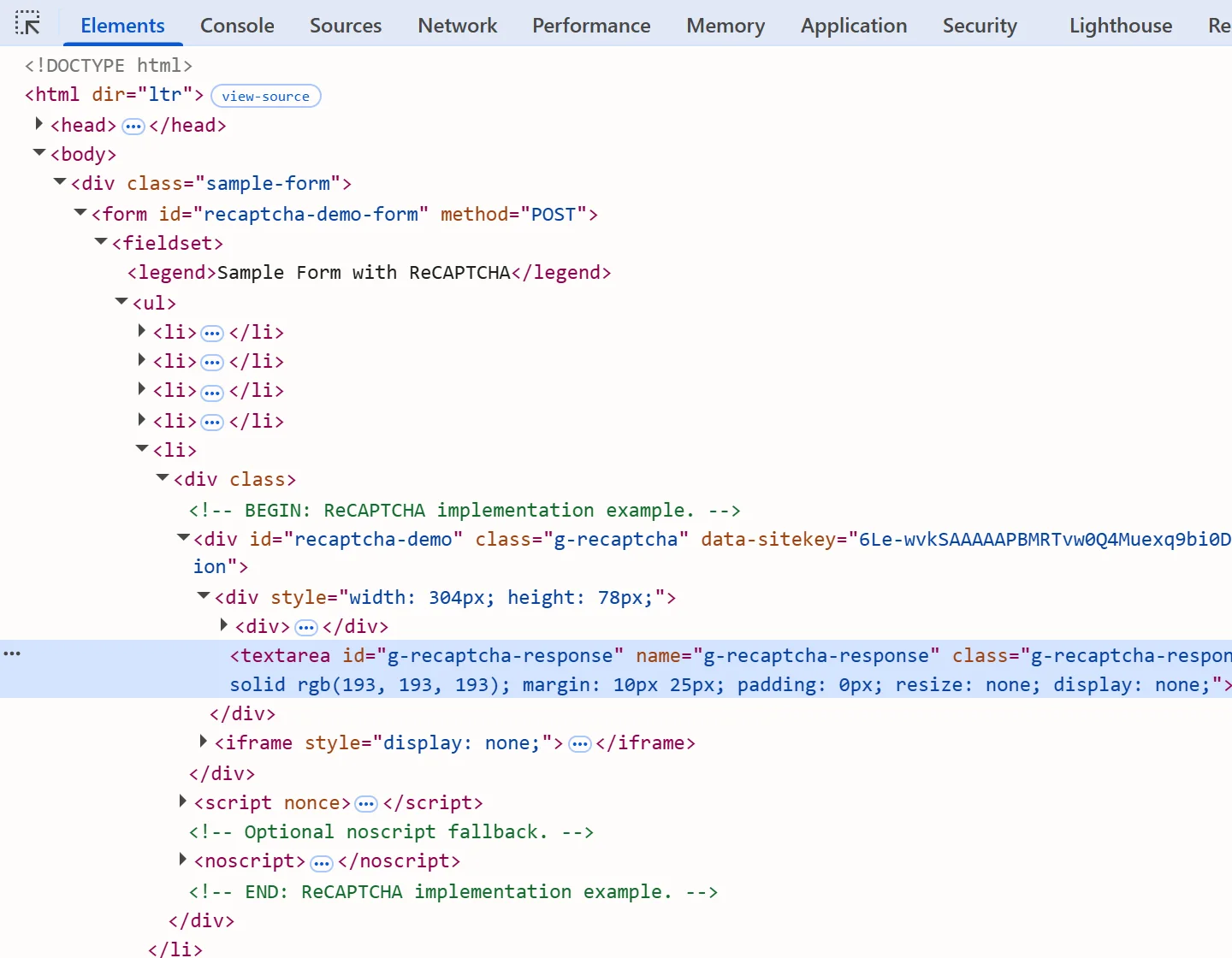
Callback. Some widgets carry data-callback="onSubmit" and expect the token to be passed to that function. If the attribute names a global function, call window.onSubmit(token). If the widget was created from JavaScript, the callback lives inside the page's own script; its path varies between pages, so find it in the source. The token submission guide walks through finding callbacks.
Direct POST. When the form posts to an endpoint you can reach without a browser, send the token as the g-recaptcha-response field together with the other form fields.
Tokens are single-use and short-lived. Vendors put the lifetime at about two minutes, with a window as short as 60 seconds in one vendor's Enterprise docs, so treat 60 seconds as the safe limit: request the token right before you submit it and never cache one.
Python and Playwright end to end
This script solves the demo form, opens the page with the user agent from the solution when there is one, writes the token into the textarea and submits. Replace the constants with your own page and key.
import time

import requests
from playwright.sync_api import sync_playwright

API = 'https://api.sursolver.com'
API_KEY = 'YOUR_API_KEY'
PAGE_URL = 'https://www.google.com/recaptcha/api2/demo'
SITE_KEY = '6Le-wvkSAAAAAPBMRTvw0Q4Muexq9bi0DJwx_mJ-'
POLL_SECONDS = 3
GIVE_UP_SECONDS = 120  # your own client-side limit


def call(path, body):
    res = requests.post(f'{API}/{path}', json=body, timeout=30)
    res.raise_for_status()  # HTTP 500 carries no errorId
    data = res.json()
    if data.get('errorId') != 0:
        raise RuntimeError(f"{data.get('errorCode')}: {data.get('errorDescription')}")
    return data


def solve(task):
    created = call('createTask', {'clientKey': API_KEY, 'task': task})
    deadline = time.monotonic() + GIVE_UP_SECONDS
    while time.monotonic() < deadline:
        time.sleep(POLL_SECONDS)
        result = call('getTaskResult', {'clientKey': API_KEY, 'taskId': created['taskId']})
        if result['status'] == 'ready':
            return result['solution']
    raise TimeoutError(f"task {created['taskId']} still processing")


solution = solve({
    'type': 'ReCaptchaV2TaskProxyLess',
    'websiteURL': PAGE_URL,
    'websiteKey': SITE_KEY,
})

with sync_playwright() as p:
    browser = p.chromium.launch()
    context = browser.new_context(user_agent=solution.get('userAgent'))
    page = context.new_page()
    page.goto(PAGE_URL)
    page.evaluate(
        "token => { document.getElementById('g-recaptcha-response').value = token; }",
        solution['gRecaptchaResponse'],
    )
    page.click('form [type="submit"]')
    page.wait_for_load_state()
    print(page.title())
browser.close()For an invisible widget add 'isInvisible': True to the task. For Enterprise change the type to ReCaptchaV2EnterpriseTaskProxyLess and add 'enterprisePayload': {'s': '...'} with a value read from the page just before the call. The Playwright recipe covers driving the page from a script.
The task is created before the page loads, so the gap between the solve and the submit is only the page load. That keeps the token fresh and lets the browser use the user agent the solution reports.
Proxy or proxyless
Start proxyless. Google's verification does not report the IP that solved the challenge, so for most pages the …ProxyLess name is enough.
Use the proxy variant (ReCaptchaV2Task) when the solve and the submit must share one exit IP, for example on Google-owned pages or on sessions pinned to an address. Then send proxy as a string, and use the same proxy for the browser that submits the token. A four-part string is always read as user:password:host:port:
{
  "type": "ReCaptchaV2Task",
  "websiteURL": "https://example.com/form",
  "websiteKey": "6Le...",
  "proxy": "http://user:password@203.0.113.10:8000"
}Proxy quality matters on this path: a poor proxy is reported to lower the success rate and slow the solve. If your proxy authenticates by IP instead of by login, allow-list that IP with your proxy provider first. The Proxies guide lists the accepted formats and proxies for captcha solving goes into choosing them.
Common failures
| Symptom | Likely cause | Fix |
|---|---|---|
| Site rejects a token that looks fine | Standard task used on an Enterprise page, or the reverse | Re-check the path in the iframe snippet and pick the matching task type |
| Rejected or "try again" on an invisible widget | isInvisible missing, or set on a checkbox widget |
Match the flag to size=invisible |
| Enterprise page rejects every token | enterprisePayload.s is stale |
Read it again right before createTask |
timeout-or-duplicate at verification |
Token used twice or older than about two minutes | Request a new token, submit it once, immediately |
| Solve fails on the proxy variant | Proxy banned, unreachable or not allow-listed | Test the proxy on its own, rotate it, check the allow-list |
ERROR_INVALID_REQUEST |
Missing websiteURL or websiteKey, or a malformed field |
Read errorDescription: it names the field |
ERROR_TYPE_NOT_SUPPORTED |
Misspelled task.type, or a type that is not available |
Compare with the names in the public catalog (GET /v1/task-types) |
timeout-or-duplicate is the error Google's verification is reported to return for reused or expired tokens; what you see depends on how the site surfaces it. On a failure, request a fresh token with freshly read values instead of resubmitting the old one.
Next steps
Create an API key in the dashboard, then send the task from the Python script above with your own page URL and site key. The accepted names and parameters for every variant are in the public catalog (GET /v1/task-types), and the quickstart covers the three endpoints in order. If your target scores visits instead of showing a widget, read the reCAPTCHA v3 guide.